Beyond Beacon: Writing BOF and a Native Rust COFF Loader
Lynx August 10, 2025 #MalDev #Rust #BOF #COFFToday, I'm excited to dive into Beacon Object Files (BOFs) and the COFF loaders that bring them to life. I'll peel back the layers of the COFF file specification, and walk you through a process of building a custom COFF loader from scratch, written entirely in pure Rust, specifically for Windows ARM. Much like my previous technical deep-dives, this article will thoroughly explore the low-level details and unique specifications for both Windows and ARM architectures. By the end of this guide, you'll not only understand what BOF files are and how they're executed but also how to implement both a BOF-like format and its corresponding loader in Rust.
Beacon Object Files
Beacon Object Files (BOFs) are binary files comprising snippets of compiled code that leverage the Windows API and loader API to implement custom logic defined by programmers. In their raw form, BOFs share similarities with object files; however, they're compiled in PIC mode, which means they don't rely on specific memory addresses and may be loaded anywhere in the memory. To be executed, BOFs require a special loader that resolves all dependencies and runs the file in memory. Moreover, the BOF loader provides additional API that expresses logic not represented by the Windows API.
To load a Beacon Object File (BOF), the loader must process the COFF format, which is typically used for object files. This involves performing various operations similar to those executed by the linker and Windows loader. Specifically, the COFF loader will load COFF sections into memory, perform relocations, resolve external symbols, and more. Ultimately, the loader will locate the entry point of the BOF and call it, triggering the execution of the actual BOF logic. Such loaders can run as standalone programs or be integrated into other applications like agents or beacons generated by exploitation frameworks.
The concept of Beacon Object Files (BOFs) was first introduced by the Cobalt Strike team and implemented within their framework. A BOF is designed to run in a beacon process – a process running on a compromised machine that acts as an agent, communicating with the attackers' server (also known as the C2 server). Cobalt Strike provides a loader and API that enables the creation of custom BOFs. While most operations performed by a BOF can be expressed using Windows API, some operations are implemented in the loader and exposed to the BOF file through an API – typically achieved via C/C++ header files. Several existing implementations, including those in Rust, have created BOF files and loaders that aim to be compatible with the Cobalt Strike framework, heavily relying on the C ABI.
In contrast, I chose a distinct approach, implementing both the loader and BOF independently of the Cobalt Strike framework. This allowed me to create a more "Rusty" implementation without relying on the C ABI to provide a common interface for the Cobalt Strike loader.
Before I dive into the nitty-gritty details of the implementation, let's take a step back and gain a higher-level understanding of how BOF files are structured.
Anatomy of BOF
Beacon Object Files (BOFs) are built around three fundamental pillars:
- The entry point: This is the function from which execution of the BOF begins, equivalent to the
mainfunction found in many programming languages. It will store all logic executed by the BOF and call other functions from various APIs or within the BOF itself. - Access to Windows API: This allows the BOF to leverage the Windows operating system's functionality and interact with it as needed.
- Access to loader API: This provides the necessary interface for the BOF to communicate with the loader and execute its logic.
Following the original design, BOFs should not implement long-running tasks. Instead, they should be considered small modules that extend the functionality of the beacon on demand, akin to plugins for an agent process that communicates with a C2 server. Whenever additional functionality is needed, the BOF can be uploaded to the compromised machine and executed by the agent.
This approach also allows for a more staged approach to attacking, where not all capabilities are initially discovered. However, regarding long-running operations, I don't see any barriers in implementing more advanced operations in my implementation. In fact, I'll demonstrate how to implement a COFF loader, which opens up possibilities beyond the original design's constraints.
Now that the entry point is defined, it's time to provide access to various APIs. This may involve accessing both Windows API and loader API, or only the loader API if the Windows API is implemented or re-exported by the loader API.
The Windows API provides access to operations related to the operating system, such as writing to remote process memory. In contrast, the loader API offers more complex operations like injecting, logging, or communicating with a remote server. The actual design of the loader API depends on your own ideas, but following existing implementations, BOF logic should be built based on common operations implemented within the loader and Windows OS. Think of it like building a program from small, independent components that work together to achieve a specified goal. For example, you might create a BOF that takes a screenshot of the victim's screen and sends it to an attacker's server.
Finally, the implementation of a BOF API should be considered. A BOF file may take arguments that will be passed by the loader to the entry point, which the BOF can then use. This is especially important in languages like Rust, where there is no concept of header files known from C language. Similarly, the entry point function may return something more than void or (), notifying the loader about potential errors that may occur during BOF execution.
The following diagram provides a high-level overview of the BOF structure:

And now, let's dive into implementing a Beacon Object File in Rust!
BOF Implementation
Following the structure presented earlier, I'll start with the entry point. Based on my design assumptions, I've declared a classic Rust function without any extern declarations. This is possible because my entire stack will be implemented in Rust and there's no need to provide C ABI compatibility. The important thing to note is that the name of the function shouldn't be mangled, as the loader will be searching for a particular symbol's name. To achieve this, I decorated the entry point function with the no_mangle attribute.
That function will store all logic performed by BOF and it will call functions from loader and Windows API.
However, the default entry point for all Rust programs is a main function, and trying to compile the above code will cause an error that says main function is not defined. To resolve this, you have to add the #[no_main] attribute at the beginning of your .rs file.
Yet this is not the end. Now, during compilation, you will see a message that ends like this:
= note: LINK : fatal error LNK1561: entry point must be defined
The linker doesn't know about your custom entry point, so you have to instruct it how to locate it. To do this, create a .cargo/config.toml file in your Rust project with the following content:
[]
= [
"-C", "link-arg=/ENTRY:launch",
"-C", "link-arg=/SUBSYSTEM:CONSOLE"
]
As you can see, specifying the entry point wasn't enough to resolve all building issues. Now, when you try to build your sample BOF, you'll encounter a lot of linking errors like:
error LNK2001: unresolved external symbol memcpy
error LNK2001: unresolved external symbol memmove
There are several ways to resolve this error, such as specifying the linker to link against required C runtime libraries or implementing missing symbols yourself. However, I've decided to go with no_std to keep things simple and smooth.
Choosing no_std requires defining a custom panic handler, which is why I've also added it to my BOF code. Additionally, I've added the following options for both release and debug profiles in my Cargo.toml file:
panic = "abort"
opt-level = 0
lto = "off"
codegen-units = 1
The following listing presents the BOF code with all adjustments:
use PanicInfo;
!
Now, running cargo b should complete without issues. However, it produces an executable (EXE) file which is already linked and ready to run. As the name "Beacon Object File" might suggest, it's based on object files. Therefore, it's necessary to emit an object file during compilation. In Rust, this can be achieved with the following command:
The generated object file will be available in the target/release/deps directory. It can be inspected with hex editors or the dumpbin tool, which is provided with Microsoft Visual Studio.
Now that the base form of the BOF is ready and compiles, it's time to provide access to Windows and loader API. I'll begin with Windows API, as it's easier to implement.
Access to Windows API can be achieved by using crates like windows or declaring functions inside an extern block yourself. When using external crates, it's important to remember that my BOF template uses a no_std environment, so potential dependencies should also provide a no_std version. This time, I've opted for a simpler solution and decided to declare the required functions myself. Taking the MessageBoxA function as an example, I've written the following code:
use c_void;
type LPCSTR = *const u8;
type HWND = *mut c_void;
unsafe extern "system"
The extern block contains the MessageBoxA prototype and is decorated with the link attribute, which instructs the linker to find the listed functions in the specified library. Additionally, the block was defined as extern "system" to ensure compatibility with the Windows API, as stated in the Rust documentation.
Now, the function can be used in the launch function:
When you check the generated object file with the dumpbin tool, it will reveal __imp_MessageBoxA symbols that indicate the usage of MessageBoxA.
> dumpbin /disasm .\target\release\deps\bof_payload.o
Microsoft (R) COFF/PE Dumper Version 14.42.34436.0
Copyright (C) Microsoft Corporation.  All rights reserved.


Dump of file .\target\release\deps\bof_payload.o

File Type: COFF OBJECT

launch:
  0000000000000000: F81F0FFE  str         lr,[sp,#-0x10]!
  0000000000000004: 90000001  adrp        x1,__unnamed_1
  0000000000000008: 91000021  add         x1,x1,__unnamed_1
  000000000000000C: 90000002  adrp        x2,__unnamed_2
  0000000000000010: 91000042  add         x2,x2,__unnamed_2
  0000000000000014: 90000008  adrp        x8,__imp_MessageBoxA
  0000000000000018: F9400108  ldr         x8,[x8,__imp_MessageBoxA]
  000000000000001C: AA1F03E0  mov         x0,xzr
  0000000000000020: 52800023  mov         w3,#1
  0000000000000024: D63F0100  blr         x8
  0000000000000028: F84107FE  ldr         lr,[sp],#0x10
  000000000000002C: D65F03C0  ret

rust_begin_unwind:
  0000000000000000: 14000001  b           0000000000000004
  0000000000000004: 14000000  b           0000000000000004
When it comes to accessing the loader API, things take a different turn because both the BOF and loader are written in Rust, so there's no need for providing C ABI compatibility for the launch function. Therefore, access to the Loader API can be achieved in a very "Rusty" way.
In my mind, I have trait objects. The entry point function is a regular Rust function, so it's possible to pass various arguments to that function like a trait object that will provide access to various functions implemented in the loader. For now, let's assume there's an external no_std dependency that provides the BeaconApi type. BeaconApi is a trait, so it describes an interface that some object may implement. Therefore, passing a reference to an object implementing such an interface (called a trait object), it's possible to use those object functionalities inside the launch function.
The following listing shows the full code of my examplatory Beacon Object File:
use BeaconApi;
use ;
type LPCSTR = *const u8;
type HWND = *mut c_void;
const MB_OKCANCEL: u32 = 1;
unsafe extern "system"
!
And here's the Cargo.toml file:
[]
= "bof-payload"
= "0.1.0"
= "2021"
[]
= { = "../bof-api" }
[]
= "abort"
= 0
= "off"
= 1
[]
= "abort"
= 0
= "off"
= 1
Having implemented the draft of the Beacon Object File, it's time to dive into the COFF format and implement the loader, but before that, I'll show you how to define the BeaconApi trait, because it's pretty straightforward, and the loader will also use that trait as a dependency.
Loader API
The API of the Loader will provide access to additional functionalities that aren't covered by Windows API or are more complex yet pretty common, so having to write them each time in BOF may be a waste of time. What is more, access to Windows API may also be provided through Loader API and not by declaring required Windows functions inside BOF.
This approach has both advantages and disadvantages. The advantage is that the BOF file doesn't contain direct references to Windows functions, so it may be easier to evade detection by security products. For example, when the BOF file contains symbols like VirtualAlloc, WriteProcessMemory, or CreateRemoteThread, an AV solution may assume that this file will do something related to injections. Yet, if you replace those functions with references to Loader API, where names of the functions may be whatever you want, it will be harder to predict what the file is actually doing. Therefore, providing access to WinAPI through loader API may serve as an obfuscation technique. On the other hand, the disadvantage lies in the need to replicate functionality that already exists in the Windows API - even if the implementation is realized through simple function re-exporting.
Going into implementation details, the loader's API will be split between two places:
- A library that will contain declarations of functions implemented by the loader.
- A loader that will provide the implementation of functions exposed in the library.
In practice, this means that the library will store a trait, and the loader will implement that trait for a given struct and pass such an object to the BOF's entry point.
To implement this, I've created a Rust library named bof-api and inside lib.rs file I've defined the BeaconApi trait.
My trait will only provide one function, which will implement printing to stdout. Notice that I've defined the bof-api library as no_std. This is because the BOF itself is no_std, so it may only use dependencies that also do not rely on the Rust standard library.
Now, inside the BOF project, I've added the following dependency in the Cargo.toml:
[]
= { = "../bof-api" }
Such a dependency will also be added in the BOF Loader project, so the loader will be able to provide an implementation for the BeaconApi trait.
And this is it. Now it's time for the big boy – so for the BOF loader! But before writing the BOF loader, you have to understand the COFF format.
COFF Format
The COFF format, like the PE format which is based on it, describes the underlying object file that contains compiled code and various metadata generated by the compiler. By looking into Common Object File Format, you'll see that some headers and structs relate to both object and image files or only to one of them.
This is because an object file and an image file are two different things, despite being strongly related with each other. An object file is generated by the compiler and cannot be executed directly; first, it has to be processed by the linker which will resolve external dependencies and produce an image file that can be executed by the system loader.
Object files have a .o extension, and image files have a .exe or .dll extension in the case of Windows operating systems. As I said, both formats are similar in some ways. What I mean is that object files are blueprints from which image files are built. Therefore, both formats follow similar design principles and they have the following similarities: for example, both files are organized within sections that contain different data like code in the .text section and read-only data in the .rdata section.
From the perspective of building a COFF loader, the most important parts of the COFF format are:
- File header
- Section table
- Symbol table
- Relocation table
- String table
The following chapters will present the most important aspects of COFF files from the perspective of writing a COFF loader. First, I'll discuss all the theory, and then I'll present the COFF format in more practical aspects.
Practical analysis will be performed using dumpbin tool (which is supplied with Visual Studio).
File and Section Headers
In the object file, there is only one file header: the COFF File Header. This header serves as the starting point of the COFF structure and contains general file statistics. From the perspective of building a COFF loader, the most important fields are:
- Machine: describes the architecture of the object file
- PointerToSymbolTable and NumberOfSymbols: allow for locating the Symbol Table and iterating all defined symbols
- NumberOfSections: informs how many sections are stored in the object file, making it possible to iterate through the sections
After the COFF File Header, there is the Section Table, which consists of Section Headers. Each section header describes a separate section in the file. Sections contain actual data, such as code that will be executed. In some cases, there may be multiple headers describing sections with the same name, which is due to how modern compilers organize data.
The fields of interest in the Section Header are:
- Name: the name of the section (
.text,.rdata,.pdataetc.) - SizeOfRawData and PointerToRawData: describe where to find actual section's content that will be copied into memory, as well as its size
- PointerToRelocations and NumberOfRelocations: point to relocations for the current section and describe how many relocations there are
- Characteristics: may be used to decide with what permission a section should be allocated in memory (read, write or execute)
When parsing the COFF file, the process will look as follows:
- Read the COFF File Header, check the file architecture, and get the number of sections.
- Move the reading pointer by the size of the File Header to get to the beginning of the Section Table.
- Read the declared number of sections and for each section:
- Allocate memory with read-write permissions and copy section's content into that memory
- Apply all relocations for the current section
- Adjust memory permission for allocated sections (some sections are read-only, some have to be executable)
Symbol and String Tables
The Symbol Table as its name suggests, contains all symbols defined within the object file. This includes among other things internal and external functions, references to read-only data like string literals, and more. For example, this is where information about the BOF entry point may be found.
The fields of interest in the Symbol Table are:
- Name: the name of the symbol, which can be particularly useful when handling functions from external libraries
- Value: may be used to locate the symbol within a section (for example, when locating a string literal in the
.rdatasection, this field will contain an offset that indicates where the string begins, calculated from the beginning of the section) - SectionNumber: identifies which section the symbol is stored in; if the value is 0, it means that the symbol is external
- StorageClass: among other things, describes how to interpret the Value field
The COFF String Table follows the COFF Symbol Table and contains the names of all symbols. If the name of a symbol is longer than 8 bytes, then the Name field in the Symbol's Table entry will contain an offset to the String Table. All strings in the String Table are null-terminated.
Relocation Table
The final table is the Relocation Table, which specifies how section data should be modified when loaded into memory. Each relocation entry contains only three fields:
- VirtualAddress: this is the offset from the beginning of the section, allowing for locating data that needs to be patched
- SymbolTableIndex: a zero-based index in the Symbol Table, allowing for locating symbols related to relocations
- Type: describes what kind of relocation should be applied; there is an extensive list of relocation kinds that are different for each processor architecture
Now that you have a theoretical overview of the COFF format, it's time to play with the generated BOF file and try to understand all those structures in practice.
Practical insight
When the compiler generates an object file, it doesn't resolve addresses to external symbols like Windows API functions or addresses to strings placed in the .rdata section. Instead, it produces information in the Relocation Table that such relocations have to be applied by the linker. So, it's the linker's responsibility to resolve the address of an external function or calculate the address of a global variable that will be used in a function invocation.
Let's take a look at the following code:
let _ = MessageBoxA;
There's a call to an external function MessageBoxA that will be resolved by the linker, but also two text parameters Test test and Test window will be placed in the .rdata section. The linker will have to calculate the addresses of these two strings and feed those addresses to the appropriate registers. Therefore, such a function invocation should introduce 3 relocations.
Now let's look at this disassembly dump of the launch function:
launch:
  0000000000000000: D10083FF  sub         sp,sp,#0x20
  0000000000000004: F9000BFE  str         lr,[sp,#0x10]
  0000000000000008: F90003E1  str         x1,[sp]
  000000000000000C: F90007E0  str         x0,[sp,#8]
  0000000000000010: 90000001  adrp        x1,__unnamed_1
  0000000000000014: 91000021  add         x1,x1,__unnamed_1
  0000000000000018: 90000002  adrp        x2,__unnamed_2
  000000000000001C: 91000042  add         x2,x2,__unnamed_2
  0000000000000020: 90000008  adrp        x8,__imp_MessageBoxA
  0000000000000024: F9400108  ldr         x8,[x8,__imp_MessageBoxA]
  0000000000000028: AA1F03E0  mov         x0,xzr
  000000000000002C: 52800023  mov         w3,#1
  0000000000000030: D63F0100  blr         x8
  0000000000000034: F94003E1  ldr         x1,[sp]
  0000000000000038: F94007E0  ldr         x0,[sp,#8]
  000000000000003C: F9400C28  ldr         x8,[x1,#0x18]
  0000000000000040: 90000001  adrp        x1,__unnamed_3
  0000000000000044: 91000021  add         x1,x1,__unnamed_3
  0000000000000048: 528001C9  mov         w9,#0xE
  000000000000004C: 2A0903E2  mov         w2,w9
  0000000000000050: D63F0100  blr         x8
  0000000000000054: F9400BFE  ldr         lr,[sp,#0x10]
  0000000000000058: 910083FF  add         sp,sp,#0x20
  000000000000005C: D65F03C0  ret
Following the calling convention on Windows ARM, there are the following:
- x0 stores the first argument, so the instruction is
mov x0, xzr - x1 stores the address to the "Test test" string:
adrp x1, __unnamed_1andadd x1,x1,__unnamed_1 - x2 stores the address to the "Test window" string:
adrp x2, __unnamed_2andadd x2,x2,__unnamed_2 - x3 stores the
MB_OKCANCELvalue which is equal to 1:mov w3, #1 - x8 stores the address of the
MessageBoxA:adrp x8, __imp_MessageBoxAandldr x8, [x8,__imp_MessageBoxA] - The
MessageBoxAis called by the instructionblr x8
Speaking about those symbols, they can be examined with the following dumpbin command:
PS D:\malware-decoded\rust\BOFs\bof-payload\target\release\deps> dumpbin.exe /symbols .\bof_payload.o
Microsoft (R) COFF/PE Dumper Version 14.42.34436.0
Copyright (C) Microsoft Corporation.  All rights reserved.


Dump of file .\bof_payload.o

File Type: COFF OBJECT

COFF SYMBOL TABLE
000 00000000 SECT1  notype       Static       | .text
002 00000000 SECT2  notype       Static       | .data
004 00000000 SECT3  notype       Static       | .bss
006 00000000 SECT4  notype       Static       | .text
008 00000000 SECT4  notype ()    External     | launch
009 00000000 SECT9  notype       Static       | .xdata
00B 00000000 SECT5  notype       Static       | .text
00D 00000000 SECT5  notype ()    External     | rust_begin_unwind
00E 00000000 SECT6  notype       Static       | .rdata
010 00000000 SECT6  notype       Static       | __unnamed_1
011 00000000 SECT7  notype       Static       | .rdata
013 00000000 SECT7  notype       Static       | __unnamed_2
014 00000000 SECT8  notype       Static       | .rdata
016 00000000 SECT8  notype       Static       | __unnamed_3
017 00000000 SECTA  notype       Static       | .pdata
019 00000000 ABS    notype       Static       | @feat.00
01A 00000000 UNDEF  notype       External     | __imp_MessageBoxA
01B 00000000 DEBUG  notype       Filename     | .file
You can see that all __unnamed_* symbols were placed in the .rdata section. This is because those symbols refer to string literals and they are read-only, so by default, the compiler places them in a section that contains read-only data.
The __imp_MessageBoxA symbol was marked as External, which is also very important information that informs the linker that this symbol should be searched for in external DLLs.
To ensure that the __unnamed_* symbols refer to strings, you can examine the .rdata section with the following command:
PS D:\malware-decoded\rust\BOFs\bof-payload\target\release\deps> dumpbin /section:.rdata /rawdata .\bof_payload.o
Microsoft (R) COFF/PE Dumper Version 14.42.34436.0
Copyright (C) Microsoft Corporation.  All rights reserved.


Dump of file .\bof_payload.o

File Type: COFF OBJECT

SECTION HEADER #6
  .rdata name
       0 physical address
       0 virtual address
       A size of raw data
     264 file pointer to raw data (00000264 to 0000026D)
       0 file pointer to relocation table
       0 file pointer to line numbers
       0 number of relocations
       0 number of line numbers
40101040 flags
         Initialized Data
         COMDAT; sym= __unnamed_1
         1 byte align
         Read Only

RAW DATA #6
  00000000: 54 65 73 74 20 74 65 73 74 00                    Test test.

SECTION HEADER #7
  .rdata name
       0 physical address
       0 virtual address
       C size of raw data
     26E file pointer to raw data (0000026E to 00000279)
       0 file pointer to relocation table
       0 file pointer to line numbers
       0 number of relocations
       0 number of line numbers
40101040 flags
         Initialized Data
         COMDAT; sym= __unnamed_2
         1 byte align
         Read Only

RAW DATA #7
  00000000: 54 65 73 74 20 77 69 6E 64 6F 77 00              Test window.

SECTION HEADER #8
  .rdata name
       0 physical address
       0 virtual address
       E size of raw data
     27A file pointer to raw data (0000027A to 00000287)
       0 file pointer to relocation table
       0 file pointer to line numbers
       0 number of relocations
       0 number of line numbers
40101040 flags
         Initialized Data
         COMDAT; sym= __unnamed_3
         1 byte align
         Read Only

RAW DATA #8
  00000000: 48 65 6C 6C 6F 20 66 72 6F 6D 20 42 4F 46        Hello from BOF
As you can see, the strings are present in the .rdata section, and even dumpbin tool displayed what symbol refers to particular string.
Now, going back to relocations. What we know is that in an object file, instructions referencing symbols actually don't point to actual addresses of data, yet they store some placeholder value. Again, take a look at this piece of assembly code:
0000000000000010: 90000001  adrp        x1,__unnamed_1
0000000000000014: 91000021  add         x1,x1,__unnamed_1
The base opcode of the ADRP instruction is 0x90000000. In the above code, we got 0x90000001, so within the instruction, only the x1 register was encoded. Based on my previous post, the ADRP instruction calculates the final address based on its own address and a shift value that's encoded within it. However, here the file isn't loaded in memory yet, and the ADRP position is expressed as a relative offset to the beginning of the .text section, so calculations don't make sense.
Therefore, when the loader places the above code in memory, it will traverse a special structure called the Relocation Table. This table can be viewed with the following command:
PS D:\malware-decoded\rust\BOFs\bof-payload\target\release\deps> dumpbin.exe /relocations .\bof_payload.o
Microsoft (R) COFF/PE Dumper Version 14.42.34436.0
Copyright (C) Microsoft Corporation.  All rights reserved.


Dump of file .\bof_payload.o

File Type: COFF OBJECT

RELOCATIONS #4
                                                Symbol    Symbol
 Offset    Type              Applied To         Index     Name
 --------  ----------------  -----------------  --------  ------
 00000010  PAGEBASE_REL21             90000001        10  __unnamed_1
 00000014  PAGEOFFSET_12A             91000021        10  __unnamed_1
 00000018  PAGEBASE_REL21             90000002        13  __unnamed_2
 0000001C  PAGEOFFSET_12A             91000042        13  __unnamed_2
 00000020  PAGEBASE_REL21             90000008        1A  __imp_MessageBoxA
 00000024  PAGEOFFSET_12L             F9400108        1A  __imp_MessageBoxA
 00000040  PAGEBASE_REL21             90000001        16  __unnamed_3
 00000044  PAGEOFFSET_12A             91000021        16  __unnamed_3

RELOCATIONS #A
                                                Symbol    Symbol
 Offset    Type              Applied To         Index     Name
 --------  ----------------  -----------------  --------  ------
 00000000  ADDR32NB                   00000000         6  .text
 00000004  ADDR32NB                   00000000         9  .xdata
The Relocation Table contains information about all relocations that have to be performed. Take a look at the first relocation:
RELOCATIONS #4
                                                Symbol    Symbol
 Offset    Type              Applied To         Index     Name
 --------  ----------------  -----------------  --------  ------
 00000010  PAGEBASE_REL21             90000001        10  __unnamed_1
This relocation refers to section #4, which is a .text section.
SECTION HEADER #4
   .text name
       0 physical address
       0 virtual address
      60 size of raw data
     1A4 file pointer to raw data (000001A4 to 00000203)
     204 file pointer to relocation table
       0 file pointer to line numbers
       8 number of relocations
       0 number of line numbers
60301020 flags
         Code
         COMDAT; sym= launch
         4 byte align
         Execute Read
The relocation is applied to the instruction at offset 0x10, specifically the ADRP instruction in the launch function:
launch:
  0000000000000000: D10083FF  sub         sp,sp,#0x20
  0000000000000004: F9000BFE  str         lr,[sp,#0x10]
  0000000000000008: F90003E1  str         x1,[sp]
  000000000000000C: F90007E0  str         x0,[sp,#8]
  0000000000000010: 90000001  adrp        x1,__unnamed_1
As you can see, the output from dumbbin tool contains an ADRP instruction opcode. There is also a relocation type which is described here as "The page base of the target, for ADRP instruction".
Finally, there is information about which symbol this relocation refers to. In this case, it's an __unnamed_1 symbol with index 10, and if you take a look at the symbol table, you'll see that the __unnamed_1 symbol is actually placed at index 10.
COFF SYMBOL TABLE
010 00000000 SECT6  notype       Static       | __unnamed_1
013 00000000 SECT7  notype       Static       | __unnamed_2
016 00000000 SECT8  notype       Static       | __unnamed_3
The symbol __unnamed_1 is stored in the section number 6, which corresponds to the .rdata section:
SECTION HEADER #6
  .rdata name
       0 physical address
       0 virtual address
       A size of raw data
     264 file pointer to raw data (00000264 to 0000026D)
       0 file pointer to relocation table
       0 file pointer to line numbers
       0 number of relocations
       0 number of line numbers
40101040 flags
         Initialized Data
         COMDAT; sym= __unnamed_1
         1 byte align
         Read Only

RAW DATA #6
  00000000: 54 65 73 74 20 74 65 73 74 00                    Test test.
To summarize, code in an object file when referring to symbols contains placeholder values that will be overwritten by the linker. The linker traverses the Relocation Table, which stores information about where in the code relocation is needed and to which symbol it should be applied.
When processing each relocation entry, the linker resolves the address of the symbol and patches the instruction so it will point to the address where the required symbol is stored, for example in the .rdata section that was loaded into memory.
The following figure illustrates the process of performing relocations:

BOF Loader
As stated earlier in this blog post, Beacon Object Files (BOFs) cannot be executed directly and require a loader to run. To execute a BOF, a loader must substitute the linker and system loader. The loader will perform several steps to achieve this:
- Load the BOF from disk
- Allocate memory for non-zero sections of the BOF and copy their contents from the file to memory
- Parse relocations and resolve external symbols across all BOF sections
- Locate the entry point of the BOF, retrieving a pointer to that function
- Prepare arguments for the entry point function, such as creating an object implementing the loader API
- Call the entry point function with the required arguments
- Clean up all artifacts
The most complex part of this process is parsing relocations. However, with proper crates and Microsoft documentation, it's not a daunting task to implement a relocation parser.
The bof-loader project has been created with the following Cargo.toml file:
[]
= "bof-loader"
= "0.1.0"
= "2021"
[]
= { = "../bof-api" }
= "0.32.1"
= "1.0.98"
= { = "0.61.1", = ["Win32", "Win32_System", "Win32_System_Diagnostics", "Win32_System_Diagnostics_Debug", "Win32_System_Diagnostics_ToolHelp", "Win32_System_LibraryLoader", "Win32_System_Memory", "Win32_System_ProcessStatus", "Win32_System_Threading"] }
= "1.3.0"
= "0.4.27"
To begin, the bof-loader project relies on three crucial crates: bof-api, which provides access to the loader interface; object, which offers logic and structures for COFF parsing; and windows, which provides access to the Windows API. With these tools in place, the first step is to load the BOF file into memory.
Loading BOF into memory
Loading a BOF into memory is a straightforward process that consists of two steps: first, reading the content of the object file into a buffer; and second, traversing section headers to copy each section's content into memory.
In my implementation, I have defined a CoffLoader structure that implements two functions with self-descriptive names.
In the allocate_sections function, a ParsedCoff structure is created which acts as a simple wrapper around types from the object crate.
The ParsedCoff structure serves as a convenient wrapper for important types from the object crate, making it easier to access these types. Since all these structs rely on borrowed data, creating this structure does not involve additional copies, which helps maintain efficiency.
After initial COFF file parsing, it's time to iterate through all sections. To optimize memory usage, I've opted to allocate memory only for non-zero-sized sections. The AllocatedSection structure, implemented as a RAII-compliant type, handles this allocation in the following way:
The AllocatedSection structure uses VirtualAlloc and VirtualFree for memory management under the hood. All sections are allocated with full permissions (read, write and execute) to accommodate processing relocations, which requires writing to memory. Later, permissions may be adjusted based on the Characteristics field in the Section Header.
The allocation process involves locating section data in the file and copying it using the std::ptr::copy function. Next, an AllocatedSection structure is created, storing:
- A pointer to the memory address where the section was allocated
- The section name
- And a reference to the section header, facilitating relocation parsing
All allocated sections are stored in a Vec, which is returned by the allocate_sections function. This allows the program to utilize these sections later on.
At this point, the main function takes shape as follows:
let file_to_load = &from;
let mut coff_loader = CoffLoader;
info!;
let binary = coff_loader.load_coff_file?;
info!;
info!;
let allocated_sections = coff_loader.allocate_sections?;
info!;
With all sections loaded into memory, it's now time to tackle relocations!
Processing relocations
Relocations are processed exclusively for allocated sections. The AllocatedSection structure contains a reference to an ImageSectionHeader, allowing direct access to relocations for a given section.
Before processing relocations, my implementation first calculates the delta between the actual section number in the COFF file and the sections that were allocated in memory. This is necessary because the loader only allocates sections with non-zero SizeOfRawData. As a result, this introduces a shift when referencing sections via the symbol table. For example, if a COFF file has 5 sections but only 3 are allocated, then if the symbol table contains a reference to section number 4, it will actually refer to the section at index 1 in the vector of AllocatedSection.
COFF Sections In Object File        COFF Sections In Memory
Number  Name    Size                Number  Name    Size    Position in vector
1       .text   0                   2       .data   8       0
2       .data   8                   4       .text   32      1
3       .bss    0                   5       .rdata  16      2
4       .text   32
5       .rdata  16
The beginning of the handle_relocations function begins with the process of delta calculation. Additionally, a Patcher struct is created to be responsible for modifying instructions that are influenced by relocations.
The delta calculation is relatively naive and does not account for more complex scenarios, such as when the very first sections are shifted. However, it works sufficiently well for my simple BOF example. When the delta is calculated, it's time to enumerate relocations. For each section, the function checks if there are any relocations. If so, the function processes them:
Each relocation is processed according to the following steps:
- The program retrieves the address of the symbol referenced by the relocation.
- If the symbol is external, the program resolves that symbol and returns its address.
- If the symbol is static or internal, the program locates it in a proper section that is loaded in memory.
- The program obtains the address of the instruction where the relocation needs to be applied.
- The program patches the instruction so it references the proper address.
Without delving into the specifics of obtaining the symbol address, the procedure follows this outline:
for relocation in relocations
Here, additional wrapping structures CoffRelocation and CoffSymbol were introduced.
External symbols are resolved by delegating all work to the Resolver structure, which will be discussed later.
if !symbol.is_external_symbol
let symbol_name = symbol.get_name_without_prefix;
debug!;
self.resolver.resolve_symbol?
Internal symbols' addresses are resolved by locating the base addresses of the sections in which these symbols are stored.
Here, each symbol resides in a different section - different in the sense that each symbol is placed in a section with a separate Section Header, even if multiple symbols belong to sections with the same name (e.g. .rdata).
As a result, the loader allocates a separate memory region (aka AllocatedSection) for each symbol, and the address of that region becomes the symbol’s address. In this implementation, the base address stored in the AllocatedSection is effectively the address of the symbol itself.
trace!;
let section_difference = symbol.section_number - section_delta - 1;
let allocated_symbol_section = sections
.get
.expect;
allocated_symbol_section.base_address
The complete handle_relocations function appears as follows:
Now that the relocation process has been covered, let's take a closer look at two essential components that haven't been discussed yet: the Symbol Resolver and the Instruction Patcher. These crucial parts will play a vital role in resolving external symbols and patching instructions accordingly.
Resolving external symbols
External symbols are resolved by the Resolver structure, which contains:
ModuleResolver- loads DLLs into memory if they weren't loaded yet,SymbolResolver- searches for functions with given names in loaded DLLs.
The Resolver implements a concept known as preloading, which loads specified DLLs at program start, ensuring that they will be available when particular symbols are searched. This approach simplifies implementation because there is no need for runtime binding of symbols to the DLL from which those symbols originate.
Module Resolver
The ModuleResolver, under the hood, relies on EnumProcessModules and LoadLibraryA as the core of its operations, along with internal vector enumeration. The basic idea is simple: it checks which DLLs are loaded into process memory using EnumProcessModules, and adds information about those DLLs to an internal vector that serves as a cache. When a new DLL is loaded, the module resolver refreshes its internal cache to preserve information about the newly loaded DLL.
In some places, code was generated by the LLMs, which may appear unusual compared to my usual coding style.
Symbol Resolver
The Symbol Resolver implementation is relatively simple. It uses GetProcAddress to obtain the address of a symbol from a loaded DLL. The resolver tries to find defined symbols in all loaded DLLs, although this may not be an optimal solution. However, it is at least a straightforward approach.
In addition, the Symbol Resolver caches already resolved symbols, so there is no need for multiple searches if a symbol was resolved in the past.
Patching instructions
The Instruction Patcher is responsible for modifying instructions influenced by relocations. The main function of the patcher is patch_instruction, which takes three arguments:
- A pointer to the instruction that needs to be modified,
- A pointer to the symbol that the instruction will reference,
- A relocation kind, allowing for instruction identification.
The instruction patching process involves encoding the symbol address within the underlying instruction. This is done by deconstructing the assembly instruction, modifying its bytes, and writing it back into memory.
The process is similar to the one described previously, with the difference that the patched instruction cannot be replaced by other instructions that would have a similar effect, as described here.
In my implementation, I've decided to cover only 4 types of relocation, with 3 of them requiring instruction patching. These cases include ADRP patching, ADD patching, and LDR patching. However, only ADRP patching requires special handling due to distance limits enforced by the ADRP instruction.
Therefore, the function that patches ADRP tries to allocate a new memory page that will be within the range of the ADRP instruction. This is done by the allocate_thunk_page_near function, which searches for a free memory page around the page where the ADRP instruction is located. The search for a free memory region is performed in both directions ("above" and "under") the page in which ADRP lies.
When a new memory page is allocated for the use of ADRP instruction, the address of a symbol is written to that new memory page. Therefore, when the LDR instruction loads memory which contains the address of the symbol, that symbol is later referenced. This situation may be described as a pointer-to-pointer scenario.
The final implementation of the Patcher is presented below:
To keep track of these internal relocations, the Patcher also contains an internal HashMap that stores all such relocations. This allows the patcher to consider new addresses for symbols that have been relocated during the patching process.
Locating BOF entry point
After loading the BOF into memory and processing all relocations, the BOF's entry point is located so that the launch function can be called.
This is done by the following function:
type LaunchFn = fn;
The process of locating the entry point involves calling the get_symbol_address function and converting the received pointer to a function that can be called later by the program. The internal details of the entry point location are implemented in the following function:
The function traverses the COFF Symbol Table, searching for a symbol that matches the provided name. Upon locating the symbol, it precisely identifies its location within the corresponding section that has been loaded into memory, and returns a pointer to that symbol.
Preparing entry point arguments
Once the entry point has been located, it's time to prepare its arguments for execution. In my case, the BOF entry point takes only one argument, which is a reference to an object that implements the BeaconApi trait. To facilitate this, I defined a struct that would implement this trait.
use BeaconApi;
;
Calling BOF entry point
The time has come to execute the BOF entry point, marking the culmination of all previous efforts. The complete main function that utilizes all described components is shown below.
As the process comes to a close, attention turns to cleaning up all remaining artifacts, including any allocated memory. This typically involves deallocating memory through the use of Drop methods within structures such as AllocatedSection.
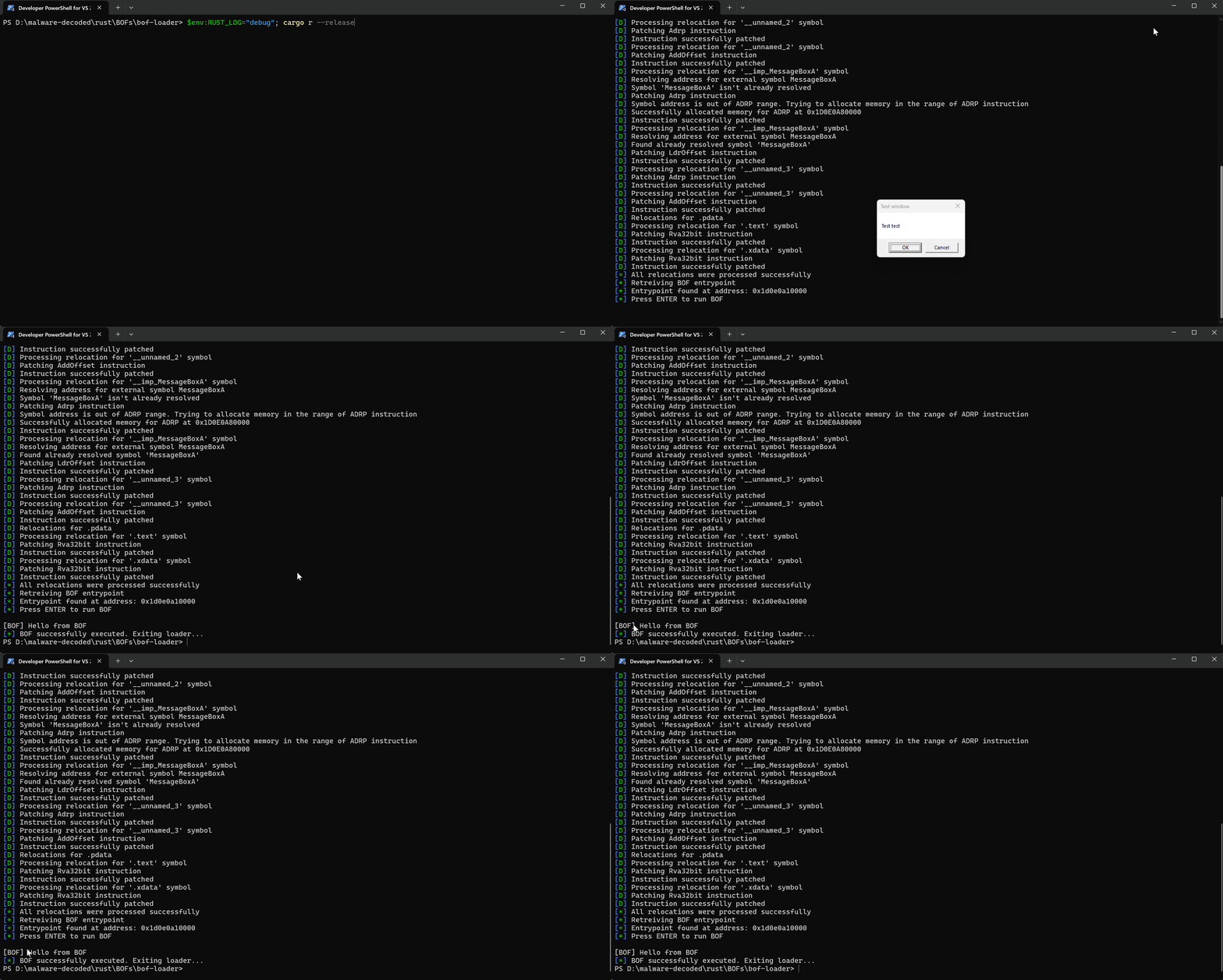
The following animation illustrates the step-by-step process of launching a BOF file using the loader:
Summary
In this extensive piece, I have provided a step-by-step guide on how to write a Beacon Object File (BOF) in Rust, mimicking the structure and functionality of a real BOF.
The article delves deeply into the implementation of a COFF (Common Object File Format) loader that transforms an object file into executable code capable of being executed directly in memory.
From a practical standpoint, this article offers a detailed exploration of the COFF format as seen through the lens of constructing a COFF loader. Moreover, it presents solutions to various challenges that emerge when crafting one's own COFF loader.
Although the implementation is not yet complete, as certain aspects of the COFF format were left unexplored, I have striven to provide a comprehensive understanding of what a COFF loader entails and how it can be implemented in Rust. Additionally, I have identified opportunities for improvement, such as adapting the form of the BOF file and minimizing relocations, which will be discussed in subsequent posts.
This article serves as a comprehensive resource for anyone seeking to create their own custom BOF-like files in Rust.